QR codes are everywhere, but the smartest ones aren't there just because they look modern. They are useful because they remove a small annoyance from an everyday interaction. A customer doesn't want to type a long URL, a guest doesn't want to enter a complicated password, and someone attending an event probably doesn't want to stand in line just to confirm information that could be handled on a phone. That's where QR codes become genuinely useful for businesses. From menus and product packaging to events and promotions, a simple scan can connect something physical to the right digital experience in seconds. Here are 10 practical ways businesses can put QR codes to work.
- 1. Turn Printed Menus Into Digital Menus
- 2. Give Your Business Card a Digital Upgrade
- 3. Make Customer Feedback Easier to Give
- 4. Connect Customers With Your Social Profiles
- 5. Speed Up Event Check-In
- 6. Put Product Information Next to the Product
- 7. Make Posters Interactive
- 8. Let Guests Join WiFi Without Typing a Password
- 9. Help People Find Your Location
- 10. Turn Promotions Into Instant Actions
- The Best QR Code Is the One That Removes a Friction Point
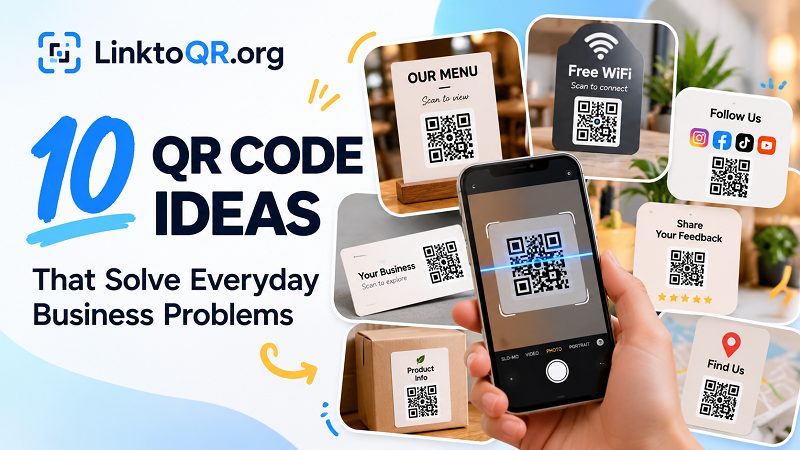
1. Turn Printed Menus Into Digital Menus
Restaurants, cafés, and food businesses are a natural fit for QR codes because menus change more often than people realize. Prices change, seasonal dishes appear, items sell out, and promotions come and go. Instead of constantly printing new menus, a business can place a QR code on tables, counters, or other visible areas and send customers to an online menu. The experience can go beyond a basic list of dishes, too. A digital menu can include photos, ingredients, allergen information, special offers, ordering instructions, or links to other useful pages. The key is to make the purpose obvious. A short message such as “Scan to view our menu” gives customers a clear reason to use the code.
2. Give Your Business Card a Digital Upgrade
Traditional business cards have very little room for information. You may want to include your website, portfolio, social profiles, contact details, booking page, and other information, but squeezing everything onto a small piece of paper quickly becomes messy. A QR code gives you another way to handle that information. Put the code on the card and let it take people directly to your website, portfolio, digital contact page, or another destination that makes sense for your business. Instead of asking someone to remember your name and search for you later, you give them an immediate path to the information they need. It also makes the physical card more flexible because the digital destination can evolve without requiring you to redesign the card itself.
3. Make Customer Feedback Easier to Give
Most businesses want customer feedback, but customers rarely go out of their way to find a feedback page. The easier approach is to put the opportunity directly in front of them when the experience is still fresh. A restaurant could place a QR code near the checkout counter, a salon could add one to a receipt, and a retailer could include one on product packaging. The scan could lead directly to a feedback form, review page, or customer survey. This removes several unnecessary steps and makes it much more likely that someone will actually respond. The important factor isn't simply having a QR code; it's placing it at the moment when giving feedback feels natural.
4. Connect Customers With Your Social Profiles
Telling customers to “find us on Instagram” sounds easy until they have to search for the correct account among countless similar usernames. A QR code can take that search out of the equation. Businesses can place one on packaging, printed materials, displays, receipts, promotional cards, or even event materials and send people directly to the relevant social profile. If a business operates across several platforms, the code can instead lead to a simple landing page containing multiple social options. This is particularly useful for brands that rely heavily on visual content because someone who discovers the business offline can move straight into its online community without typing a username or searching through results.
5. Speed Up Event Check-In
Events often create the same frustrating situation: a large number of people arrive within a short period and everyone needs to complete roughly the same process. QR codes can make that first interaction much smoother. A code printed on an invitation, ticket, badge, poster, or confirmation document can lead attendees directly to a registration form, digital ticket, event schedule, confirmation page, or check-in system. The QR code doesn't have to handle the entire event workflow. Its job is simply to remove the unnecessary step between a physical invitation and the digital information the attendee needs. When dozens or hundreds of people are arriving at once, those few seconds saved per person can make a noticeable difference.
6. Put Product Information Next to the Product
A customer standing in front of a product doesn't always need a salesperson. Sometimes they simply need more information before making a decision. A QR code placed next to the product can lead to specifications, instructions, ingredients, demonstrations, warranty details, product videos, or a more detailed product page. This is especially useful when physical display space is limited. Rather than covering shelves and packaging with paragraphs of information, businesses can keep the physical presentation clean while giving interested customers access to deeper information on demand. The result is a two-layer experience: the product remains easy to browse, while the QR code provides additional details for people who want them.
7. Make Posters Interactive
A traditional poster can communicate a message, but its job usually ends once someone reads it. A QR code gives that same piece of printed material somewhere to go next. A promotional poster can send people to a campaign page, an event poster can open registration, a product advertisement can lead directly to a product page, and a community notice can provide additional information that would never fit on the printed design. The important part is matching the destination to the message. If a poster promotes a specific event, sending people to a generic homepage creates unnecessary friction. The QR code should take them as close as possible to the action promised by the poster.
8. Let Guests Join WiFi Without Typing a Password
Some QR code use cases solve problems that seem tiny until you have to deal with them repeatedly. WiFi is a perfect example for cafés, restaurants, hotels, Airbnb properties, coworking spaces, and offices. Guests often have to ask for a password, listen while someone reads it aloud, type a mixture of letters and numbers, and then try again when one character is wrong. A wifi qr code can remove much of that friction by giving visitors a simple way to access the guest network from their phones. A code can be placed on a reception desk, café table, hotel room card, waiting area, or another location where guests naturally look for information. For businesses, it is also sensible to use a dedicated guest network rather than sharing credentials for an internal network. The QR code is simply another tool for making an otherwise repetitive interaction faster.
9. Help People Find Your Location
An address printed on a business card or flyer isn't always enough to get someone through the door. Customers may have to copy the address, open a maps application, paste it, and then figure out where exactly they are going. A QR code can shorten that process by opening a map location directly. This can be especially helpful for businesses inside shopping centers, office buildings, markets, or other locations where written directions aren't particularly intuitive. A code on an invitation, flyer, business card, storefront sign, or event announcement can give people an immediate route from discovering a location to actually navigating there.
10. Turn Promotions Into Instant Actions
One of the biggest problems with traditional advertising is the gap between seeing an offer and doing something about it. A poster might tell someone to visit a website, follow a social account, claim a discount, register for an event, or book an appointment, but every additional step creates another opportunity for that person to lose interest. A QR code can shorten the journey by sending customers directly to the relevant destination. A restaurant promotion can lead to an online menu or special offer, a retail campaign can open a coupon page, and an event advertisement can take visitors straight to registration. The goal isn't to make the QR code itself impressive. The goal is to make the next action obvious and easy.
The Best QR Code Is the One That Removes a Friction Point
There are endless ways to use QR codes, but the strongest ideas usually have something in common: they solve a problem that already exists. Customers don't want to type long URLs. Guests don't want to struggle with complicated passwords. Event attendees don't want to wait in unnecessary lines. Shoppers don't want to search for product information, and potential customers don't want to manually hunt down a company's social profile or location. A QR code becomes valuable when it removes one of those little obstacles.
That is also a useful rule when deciding where to put your next QR code. Don't start with the question, “Where can I put a QR code?” Start with, “What do I want people to do, and what's currently making that harder than it needs to be?” Once you identify the friction point, the QR code destination becomes much easier to choose. The code should feel like a shortcut, not another task.
A good QR code doesn't need to be complicated. It simply needs to connect the physical moment someone is already experiencing with the digital action they want to take next. When that connection is clear, a tiny square on a menu, poster, package, card, or sign can do a surprisingly big job.