- The Hidden Cost of Making QR Codes the Only Option
- Five Customer Situations Your QR Code Strategy Might Be Ignoring
- 1. The Dead Battery Customer
- 2. The No-Signal Visitor
- 3. The Less Tech-Savvy Customer
- 4. The Accessibility-Conscious User
- 5. The Customer Who Simply Prefers Paper
- The Alternative Access Framework: What Should Businesses Offer?
- A Simple Decision Matrix for Choosing the Right QR Code Setup
- How to Build a QR Experience Without Creating Customer Friction
- The QR Code Accessibility Checklist
- The Best QR Code Experience Gives Customers a Choice
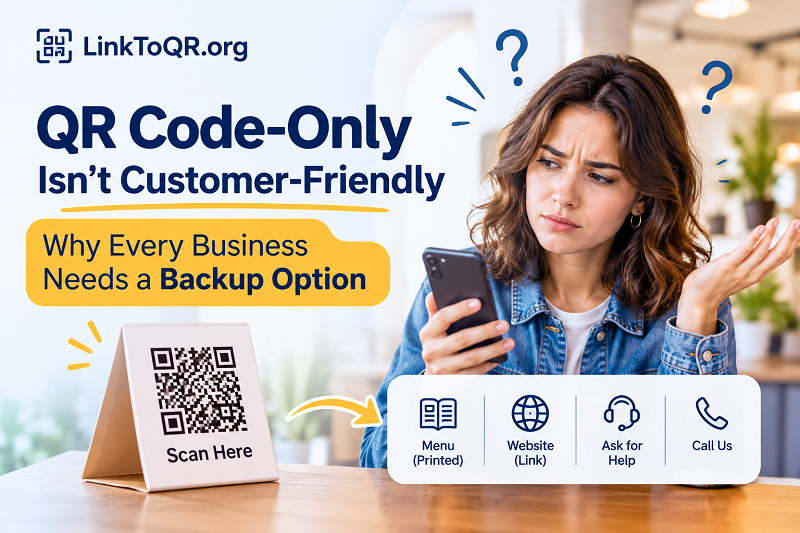
Picture this: You walk into a restaurant, grab a table, and look for the menu. Instead of a printed card, there's a small sign telling you to scan a QR code. No problem, right? You pull out your phone, open the camera, and point it at the code. Except your battery is at 1%, the restaurant's Wi-Fi isn't working, and your mobile signal has apparently decided to take the night off. Suddenly, something as simple as reading a menu becomes an unnecessary hassle.
QR codes are brilliant at connecting physical spaces with digital information. They reduce printing costs, simplify updates, and give businesses a convenient way to share links, menus, forms, product details, and much more. But convenience only works when people can actually use it. When a QR code becomes the only way to access an essential service, a smart digital upgrade can turn into a frustrating customer experience.
The real question isn't whether businesses should use QR codes. It's whether they're making customers depend on them. A well-designed QR experience should remove friction, not create a new obstacle. And that means having a backup plan.
The Hidden Cost of Making QR Codes the Only Option
Businesses often adopt QR codes with good intentions. A restaurant wants to eliminate menu reprints. A hotel wants guests to access service information without calling reception. A retailer wants shoppers to explore product details without hunting down an employee. These are all reasonable use cases.
The problem starts when convenience for the business gets confused with convenience for the customer. Removing printed materials might simplify internal operations, but it doesn't automatically make the experience better for everyone. Customers have different devices, different levels of technical confidence, and different expectations. A digital-first approach that ignores those differences can quietly exclude people.
Consider the small inconveniences that can derail a QR interaction. Someone might have an older phone with an unreliable camera. Another person might be visiting from overseas and have no mobile data available. A customer with limited vision may struggle to read tiny instructions printed beside a code. Someone else may simply prefer speaking to a staff member rather than navigating a website.
Individually, these situations might seem minor. Collectively, they create friction at exactly the moment a business should be making life easier. Customers don't necessarily complain when something like this happens. They may just abandon the interaction, ask for help, or decide that the business isn't as convenient as it claims to be.
That's the hidden cost of a QR-only strategy: the business may never realize how many customers are struggling.
Five Customer Situations Your QR Code Strategy Might Be Ignoring
Instead of designing a QR experience around an imaginary customer with a fully charged phone, perfect connectivity, and unlimited patience, consider the people who might interact with your business on an ordinary day.
1. The Dead Battery Customer
Smartphones have become essential, but batteries are still frustratingly finite. A customer arriving after a long day of travel, a busy shopping trip, or several hours at an event might have very little battery remaining. If your QR code is the only way to access a menu, ticket information, or service instructions, that customer is suddenly stuck.
The solution doesn't require abandoning digital tools. Keep a limited printed version of essential information available, or make sure staff can provide the same details when needed. A backup doesn't have to duplicate your entire digital system. It just needs to keep the customer moving.
2. The No-Signal Visitor
Internet connectivity is easy to take for granted until it disappears. Restaurants in basements, retail stores inside large buildings, rural attractions, and crowded event venues can all experience unreliable mobile connections.
A QR code that opens a web page generally needs an internet connection to retrieve its content. The code itself might scan perfectly, but the destination won't load. From the customer's perspective, the result is the same: nothing useful happens.
Businesses should test their QR destinations under realistic network conditions. Where appropriate, provide guest Wi-Fi, make critical information available in an offline format, or offer a physical alternative. Also, remember that a QR code can store certain information directly rather than linking to a website, although this approach has limitations depending on the type and amount of data involved.
3. The Less Tech-Savvy Customer
Not everyone uses a smartphone in the same way. Some customers may not know how to scan a QR code, understand what happens after scanning, or recognize where a notification appears on their screen.
This is especially relevant when serving older adults or people who aren't comfortable with digital interfaces. A tiny instruction saying "Scan here" might make perfect sense to a technology enthusiast but offer very little guidance to someone using a QR code for the first time.
A little human assistance can make a big difference. Staff should know how to explain the process without making customers feel uncomfortable. Clear instructions such as "Open your phone camera and point it at the square" are far more welcoming than assuming everyone already knows what to do.
4. The Accessibility-Conscious User
Accessibility deserves more attention than it typically receives in QR code deployment. A customer with low vision may struggle to locate a code or read the instructions around it. Someone with limited hand mobility may find positioning a phone camera difficult. Others may rely on assistive technologies that don't work smoothly with poorly designed landing pages.
The QR code is only the first step. What happens after the scan matters just as much. If the destination page contains tiny text, low-contrast buttons, confusing navigation, or inaccessible forms, the business has simply moved the accessibility problem from a printed sign to a digital screen.
Use readable typography, sufficient color contrast, descriptive links, logical page structure, and mobile-friendly layouts. Make sure important information isn't communicated through images alone. Most importantly, offer another way to access essential services when digital interaction isn't practical.
5. The Customer Who Simply Prefers Paper
Here's an uncomfortable truth for businesses obsessed with digital transformation: some customers just don't want another smartphone task added to their day.
They might be enjoying dinner and prefer looking at a physical menu. They might want to compare product specifications without switching between apps. They might feel more comfortable reading printed instructions than opening a website.
That's a preference, not a technical failure. And businesses should respect it.
Printed materials still have a place, especially when the information is essential to completing a transaction or using a service. A hybrid approach lets customers choose the method that works best for them instead of forcing everyone through the same digital doorway.
The Alternative Access Framework: What Should Businesses Offer?
A backup strategy doesn't mean printing everything, maintaining two completely separate systems, or abandoning the efficiency of QR codes. It means identifying which customer interactions are essential and ensuring there's another reasonable way to complete them.
The right alternative depends on the business, the environment, and the consequences of a failed scan.
| Business Scenario | QR Code Purpose | Recommended Backup |
|---|---|---|
| Restaurant | Display digital menus | Printed menus or staff-assisted ordering |
| Hotel | Share guest information | Information cards or reception assistance |
| Retail store | Display product details | Printed product labels or employee support |
| Event venue | Provide schedules and directions | Printed venue maps or information desks |
| Public attraction | Share visitor guides | Downloadable offline guides or printed leaflets |
| Service business | Collect customer requests | Staff-assisted forms or a direct contact option |
Think of these alternatives as different access routes to the same destination. Customers shouldn't have to abandon a task simply because one route isn't working.
For example, a restaurant can keep its digital menu as the primary option while maintaining a few printed copies for customers who need them. A hotel can use QR codes for detailed guest information while retaining essential instructions in the room. An event organizer can provide digital schedules without removing printed directional signs.
The goal isn't to make every interaction identical. It's to make sure customers can still get what they need.
A Simple Decision Matrix for Choosing the Right QR Code Setup
Before deciding whether a QR code should replace an existing process, evaluate the interaction using four practical criteria. This helps businesses distinguish between situations where digital-only access is perfectly reasonable and those where a backup is essential.
| Evaluation Criteria | Questions to Ask | What to Watch For |
|---|---|---|
| Customer Dependency | Must customers use a smartphone to complete the task? | Essential services should have alternative access. |
| Internet Dependency | Does the destination require a live internet connection? | Weak connectivity can interrupt the experience. |
| Accessibility | Can customers with different abilities and technical skills use it? | Poor accessibility can exclude entire customer groups. |
| Backup Availability | Is there another way to access the same information or service? | No alternative means a single point of failure. |
Here's a useful way to interpret the results:
- Low dependency, low risk: A QR code linking to optional promotional content can usually operate independently. If it doesn't work, customers can simply move on.
- Moderate dependency: Product specifications, digital catalogs, and event schedules should have a practical alternative, especially in locations with unreliable connectivity.
- High dependency: Information required to complete a purchase, access an essential service, or understand important safety instructions should never rely exclusively on a QR code.
One distinction matters here: not every QR code needs a backup with equal complexity. A broken link to a promotional video is inconvenient. A broken link to essential visitor instructions can create a much more serious problem. Prioritize alternatives based on the impact of failure, not simply the number of QR codes you distribute.
How to Build a QR Experience Without Creating Customer Friction
A successful implementation starts before the code is printed. Businesses should think about the entire customer journey, from noticing the QR code to completing the action on the destination page.
Start with the purpose. Identify exactly what customers should accomplish after scanning. Is it reading a menu, viewing product details, submitting a form, or accessing service information? A QR code should have a clear job rather than sending people to a generic homepage and expecting them to figure things out.
Create a direct path. Avoid unnecessary redirects, complicated navigation, and pages overloaded with unrelated content. Customers should land as close as possible to the information they need. A focused destination is usually more useful than a digital experience packed with features nobody asked for.
Generate a code that fits the destination. Once your landing page is ready, use a reliable link to qr code converter to turn the destination URL into a scannable QR code. Choose an appropriate size, maintain sufficient contrast, and leave enough clear space around the code. Before printing thousands of copies, test a sample with different smartphones.
Provide clear instructions. Don't assume customers know what the code does. Add a short explanation such as "Scan to view today's menu" or "Scan to explore product details." This sets expectations and gives people a reason to interact.
Add a practical alternative. Decide what happens when scanning isn't possible. That might mean a printed menu, a staff member who can provide assistance, a short web address, or a phone number. The alternative should be visible and easy to use, not hidden somewhere customers discover only after encountering a problem.
Test the complete experience. Scan the code from different distances, devices, and lighting conditions. Check the destination on smaller screens, test the page with slow connections, and ask people unfamiliar with your business to try it. Their confusion can reveal problems your internal team has overlooked.
Review customer feedback. Pay attention to repeated questions, abandoned interactions, and requests for alternative access. These signals can reveal whether your QR implementation is actually helping customers or simply shifting work from employees to visitors.
The QR Code Accessibility Checklist
Before rolling out a QR code across your business, use this checklist to assess whether the experience is genuinely customer-friendly.
| Question | Yes / No |
|---|---|
| Is the purpose of the QR code immediately clear? | |
| Is there a reasonable alternative for customers who cannot scan it? | |
| Can customers access the destination without complicated navigation? | |
| Does the destination work well on different smartphone screen sizes? | |
| Is the content readable and accessible to people with different needs? | |
| Have you tested the destination under weak network conditions? | |
| Can staff explain how to access the information when customers need help? | |
| Are essential services and safety information available through another method? |
If you answered "No" to several questions, your QR implementation probably needs another round of improvement. You don't necessarily need to redesign everything. Start with the interactions that create the greatest inconvenience or carry the highest consequences when something goes wrong.
The Best QR Code Experience Gives Customers a Choice
Digital convenience should feel like an upgrade, not an obligation. QR codes make it easier to connect physical products, printed materials, and real-world locations with useful online information. But their value comes from making access simpler, not from eliminating every other way to interact with a business.
The smartest businesses understand that customers aren't identical. Some love scanning QR codes, exploring digital menus, and accessing information instantly. Others prefer printed materials or a little help from a real person. Both groups deserve a smooth experience.
So, before replacing another printed menu, information card, or service process, ask one simple question: What happens if a customer cannot scan this code?
If your team has a practical answer, you're probably building a much better digital experience. Because the best technology doesn't force everyone to adapt to it. It adapts to the people using it.