Hiring doesn't always require a complicated recruitment campaign. Sometimes, you just need a reliable way to let people nearby know that you're looking for help. A restaurant needs another cook, a retail store is preparing for its busy season, or a neighborhood business wants to add someone to the team. The opportunity is there, but finding the right information shouldn't feel like a scavenger hunt.
- Why Traditional Hiring Signs Leave Interested Applicants Hanging
- Turn a Storefront Sign Into a Better Recruitment Experience
- What Should Your Facebook QR Code Open?
- Where Should You Place a Hiring QR Code?
- Create Your Facebook QR Code and Test It Before Printing
- Keep Recruitment Information Accurate After the Poster Goes Live
- Measure Whether Your Hiring QR Code Is Actually Helping
- Make Applying the Easy Part
A simple “Now Hiring” sign can catch someone's attention, but what happens next? They might be interested while walking past your storefront, yet they may not have time to call, ask questions, or search Facebook for your business later. That's where a Facebook QR code can make the next step easier.
Why Traditional Hiring Signs Leave Interested Applicants Hanging
A hiring sign has one job: get noticed. Unfortunately, getting noticed and getting applications are two very different things.
Consider a potential employee who sees your sign on the way to work. They're curious about the position, but the sign only displays your business name and a phone number. They might search for your company online that evening, only to find an outdated promotion, an unrelated post, or several businesses with similar names. Their initial interest gradually disappears.
Other common problems include missing job requirements, unclear working hours, incomplete contact details, and application instructions buried in an old social media post. For small businesses, these little obstacles can add up, especially when hiring needs to happen quickly.
The goal isn't to replace every traditional recruitment method. It's to connect the attention generated by a physical sign with useful information that applicants can access on their phones.
Turn a Storefront Sign Into a Better Recruitment Experience
A Facebook QR code creates a direct path between your hiring materials and a relevant Facebook destination. Instead of asking someone to remember your business name and look it up later, you give them a way to access the information while their interest is still fresh.
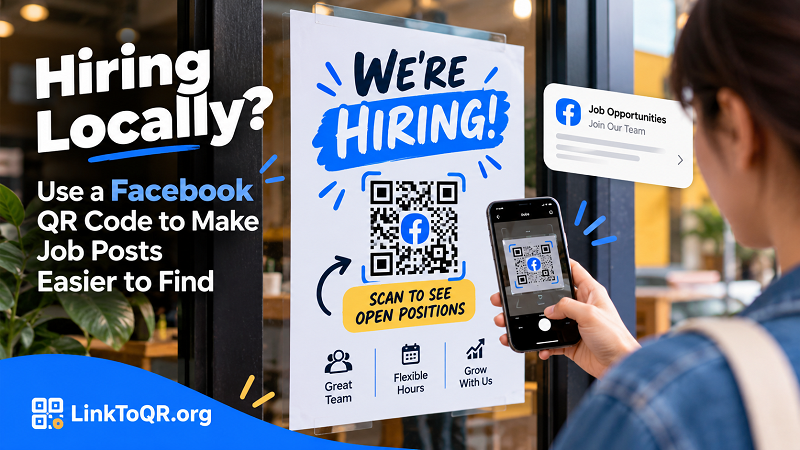
For example, a neighborhood café could display a hiring poster near its entrance with a clear message: “We're Hiring! Scan to See Open Positions.” The code could lead to a Facebook post describing the available role, expected working hours, qualifications, and application instructions.
A retail store could use the same approach when recruiting seasonal employees. A local service business might place a hiring notice on a community bulletin board, allowing interested people to learn more without needing to contact the owner immediately.
The real advantage is convenience. Applicants can review the details at their own pace, decide whether the opportunity suits them, and follow the next step when they're ready. Just make sure the destination contains the information promised by the sign; a QR code that opens an unrelated page creates another obstacle instead of removing one.
What Should Your Facebook QR Code Open?
Before creating the code, decide what you want an interested applicant to see. The destination matters just as much as the code itself.
A specific job post is usually the strongest choice when you're recruiting for one clearly defined position. Applicants can immediately see the role, requirements, and instructions without searching through unrelated content. This works particularly well for urgent vacancies or short-term hiring campaigns.
Your business's Facebook Page makes more sense when you're hiring for several positions or expect vacancies to change regularly. It gives applicants a broader view of your business and a place to discover new recruitment announcements. However, don't assume visitors will automatically find the relevant information. Pin an important hiring post when appropriate, keep the Page organized, and make open positions easy to identify.
A dedicated recruitment post or hiring announcement can be useful when your business regularly recruits across different roles. Keep the post focused, explain how to apply, and update it when positions are filled. If applicants must complete a separate application form, provide a clear route to that form rather than leaving them guessing.
Whichever destination you choose, test it from the perspective of someone who knows nothing about your business. Can they identify the position, understand the requirements, and figure out how to apply within a few moments? If not, improve the destination before printing hundreds of copies.
Where Should You Place a Hiring QR Code?
Not every location attracts the same kind of applicant. A thoughtful placement strategy can help your recruitment message reach people who are more likely to be interested in the role.
Storefront windows and entrances: These locations work well for businesses that want to reach people who already live, shop, or work nearby. Use a short headline, a visible QR code, and a direct call to action. Make sure the code can be scanned comfortably from a safe, accessible position.
Countertops and waiting areas: Customers who already visit your business may know someone looking for work. A small hiring notice near the checkout counter or waiting area gives them an easy way to share the opportunity with friends and family.
Community bulletin boards: Libraries, neighborhood centers, campuses, and other permitted community spaces can help local employers reach people outside their existing customer base. Always follow the venue's posting rules and make sure the recruitment message clearly identifies the employer.
Local job fairs and recruitment events: A QR code on a handout or booth display gives interested candidates a convenient way to revisit your hiring information after the conversation ends. This is especially helpful when your team is speaking with multiple applicants throughout the day.
Whatever the location, keep the design readable. Don't shrink the code to squeeze in more text, place it over a busy background, or position it somewhere people cannot comfortably scan. A short, specific instruction such as “Scan to Explore Open Jobs” is more useful than a vague “Scan Here.”
Create Your Facebook QR Code and Test It Before Printing
Once your destination is ready, creating the QR code is straightforward. Copy the URL of the relevant Facebook post or Page, then use a fb qr code generator to turn that link into a scannable code. Download the finished image and add it to your recruitment poster, flyer, or other hiring materials.
Before distributing anything, run through a few practical checks. Scan the code with a phone camera and confirm that it opens the intended destination. Test it on a printed sample at the actual size you plan to use, rather than relying only on a preview on your computer screen. Check that the code has sufficient contrast, enough clear space around its edges, and no design elements covering the pattern.
Next, review the mobile experience. Facebook may prompt some visitors to log in, depending on the destination and their device or browser. Check what people can actually see, and avoid promising access to information that requires permissions they may not have. If you are linking to a public hiring post, make sure its visibility settings support your intended audience.
Finally, inspect the printed material itself. The position title, location, contact information, and application instructions should all be accurate. A perfectly functioning QR code cannot rescue a recruitment poster that advertises a job you've already filled.
Keep Recruitment Information Accurate After the Poster Goes Live
Printed hiring materials have one disadvantage: they can remain in circulation long after circumstances change. You might fill a vacancy, adjust the schedule, or decide to recruit for a different role. If the QR code still leads to an outdated announcement, applicants can end up wasting their time.
Build a simple maintenance routine around your recruitment campaign. Check the destination regularly, update the information when necessary, and remove posters when a position is no longer available. If the code links to a specific Facebook post that cannot be edited to reflect the change, replace the printed material or direct future campaigns to a more suitable destination.
It's also worth thinking about privacy. Don't ask applicants to publish sensitive personal information in public comments. If you need resumes, phone numbers, or other application details, explain the appropriate submission method and use a suitable channel for collecting them.
A little maintenance goes a long way toward keeping your business looking organized and trustworthy.
Measure Whether Your Hiring QR Code Is Actually Helping
A recruitment QR code shouldn't be judged by scan counts alone. Scans can tell you whether people are interacting with the code, but they don't automatically reveal whether those people are qualified candidates or whether they eventually apply.
Start by tracking the outcomes that matter to your hiring process: inquiries, completed applications, suitable candidates, interviews, and successful hires. If you place recruitment materials in several locations, use distinct destination links or other appropriate tracking methods where practical. That can help you compare which placements generate meaningful interest, provided the tracking method actually supports the measurements you want.
For example, a poster at your storefront might generate plenty of scans but very few applications, while a notice at a local community center attracts fewer visitors but produces better-qualified candidates. In that case, the smaller number may represent the more effective placement.
Also look beyond the code itself when results are disappointing. Is the pay competitive? Are the hours clear? Does the position appeal to the people who see the poster? Is the application process too complicated? These factors often have a greater influence on recruitment outcomes than the QR code's design.
Make Applying the Easy Part
Local hiring works best when interested people can quickly understand the opportunity and decide what to do next. A well-placed Facebook QR code helps bridge the gap between a physical recruitment message and the online information applicants need.
Start with a clear job post, choose a destination that makes sense, and place the code where potential applicants can comfortably find and scan it. Keep the information current, make the application process straightforward, and measure the results by the quality of the candidates you attract.
You don't need an elaborate recruitment campaign to make hiring easier. Sometimes, removing one unnecessary step is enough to turn a passing glance into a genuine application.