Putting a QR code on product packaging sounds like a clever idea until you realize you have another decision to make: what should actually happen when someone scans it? A product might have a demonstration video, an unboxing clip, a tutorial, a recipe, a review, a brand story, or an entire YouTube channel full of content. You could technically send customers to any of them, but that doesn't mean every option is equally useful.
- Start With the Moment, Not the Video
- A Tutorial Can Beat a Promotional Video
- When a Product Demo Makes More Sense
- Don't Automatically Link to Your YouTube Channel
- What About a YouTube Playlist?
- The Video Doesn't Have to Be Long
- Make the CTA Tell a Story
- Test the Experience Like a Customer
- Your Packaging Can Become More Than Packaging
The best packaging QR code isn't necessarily the one connected to your most popular video. It's the one that answers the question your customer is most likely to have at the moment they scan. That might sound like a small distinction, but it can completely change how useful the QR experience feels.
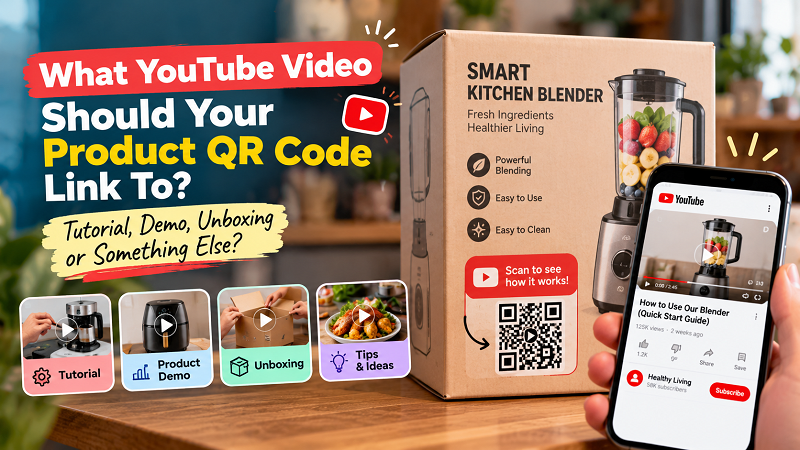
Start With the Moment, Not the Video
Imagine someone has just opened a box and found a product they've never used before. They're holding the item in one hand and their phone in the other. What are they looking for?
Probably not a five-minute brand documentary.
They want to know how the product works.
Now imagine a customer standing in a store, looking at the packaging before deciding whether to buy. Their question is different. They may want to see the product in action, understand its main features, or get a better idea of what they're actually buying.
The same product can therefore justify different QR destinations depending on where the code appears and when the customer is expected to scan it. A QR code printed on the outside of packaging has a different job from one placed inside the box. Before choosing a video, think about the exact moment in which the customer will encounter the code.
A Tutorial Can Beat a Promotional Video
Businesses naturally want to show off their products. That's understandable. But packaging isn't always the best place to push another sales message.
If someone has already purchased the product, usefulness can be more valuable than persuasion.
A short tutorial showing how to assemble, install, clean, configure, or use the product may create a much better experience than a polished promotional video. The customer already owns the product. Now they need confidence that they can use it correctly.
This is especially useful for products with a learning curve. Kitchen equipment, electronics, fitness products, tools, beauty devices, software-enabled products, and DIY items can all benefit from a quick visual explanation. A customer might eventually search YouTube for help anyway. Putting the right video behind the QR code simply removes several steps from that process.
And that is one of the strongest reasons to use a QR code on packaging: don't make customers search for information you've already created.
When a Product Demo Makes More Sense
Tutorials aren't always the answer. Sometimes the customer doesn't need instructions; they need to see what the product can actually do.
A product demonstration can work particularly well when the value is easier to understand visually than through packaging copy. A demonstration could show how quickly a device works, how a feature behaves, how a product fits together, or what the finished result looks like.
Think of the QR code as an extension of the packaging. The package handles the quick facts: product name, key features, specifications, ingredients, warnings, and basic instructions. The video can handle the things that are difficult to communicate with static text and images.
That makes the video feel like a natural continuation of the product rather than a random piece of marketing content.
Don't Automatically Link to Your YouTube Channel
This is one of the easiest mistakes to make.
A company has a YouTube channel, so it puts the channel URL behind the QR code. Problem solved, right?
Not quite.
Sending a customer to an entire channel gives them a lot of choices when what they probably wanted was one useful answer. They may have to scroll through dozens of videos to find the one that relates to their product. On a mobile device, that extra effort can be enough to make them give up.
If the customer needs a specific tutorial, send them directly to the tutorial. If they need a demonstration, send them to the demonstration. The fewer unnecessary decisions they have to make after scanning, the better.
A channel can still make sense when discovery is part of the experience. For example, a creator-led brand may genuinely want customers to explore a collection of videos. But if the packaging promises “Watch how to set up your product,” the destination should deliver exactly that.
What About a YouTube Playlist?
A playlist sits somewhere between a single video and an entire channel. It can be useful when customers may need several pieces of related information rather than one isolated video.
Consider a product that requires setup, basic operation, maintenance, and troubleshooting. One long video might become tedious, while a playlist could let customers choose the exact section they need. The same approach can work for products with multiple models, recipes, project ideas, or use cases.
There is one thing to watch, though: don't create a playlist simply because you have several videos. The collection should have a clear purpose. If the first video is an introduction, the second is a company interview, the third is an unrelated product announcement, and the fourth is a tutorial, the customer is back to hunting for information.
A playlist should reduce friction, not rearrange it.
The Video Doesn't Have to Be Long
Longer doesn't automatically mean more helpful.
For a packaging QR code, a concise video can often be more effective because the customer is usually looking for one particular answer. A 60-second demonstration that immediately shows how something works may be more valuable than a polished eight-minute presentation.
That doesn't mean every video needs to be aggressively short. Complex products sometimes require more explanation. The key is to respect the reason people are scanning.
If a customer is trying to assemble something, get to the assembly steps. If they're trying to clean it, show the cleaning process. If they're trying to understand a feature, demonstrate the feature. Avoid spending the first half of the video making them sit through information they didn't ask for.
The QR code has already earned you the customer's attention. Don't waste it.
Make the CTA Tell a Story
The words printed beside the QR code matter almost as much as the destination itself. “Scan for YouTube” doesn't give customers much motivation. It tells them where they're going but not why they should go there.
Try connecting the CTA to the customer's need instead: “Scan to see how it works,” “Watch the 60-second setup guide,” “See three ways to use it,” or “Scan for the quick-start tutorial.” These messages create an expectation, and the video should immediately fulfill it.
This also gives you a simple consistency check. Read the CTA and then open the destination. Does the video deliver exactly what the packaging promised? If not, change the destination or change the message.
Once you've selected the right YouTube URL, turning it into a QR code is the easy part. A qr youtube solution can connect the video to the physical product, but the usefulness of that connection still depends on the content waiting on the other side.
Test the Experience Like a Customer
Before sending the packaging design to the printer, forget that you created the campaign and test it as if you're seeing the product for the first time.
Scan the code. Watch what happens. Does the camera recognize it quickly? Does YouTube open without unnecessary steps? Is the video still available? Does the title make sense? Does the opening immediately match the promise on the packaging? Can the customer understand what to do next?
Then ask someone who wasn't involved in creating the packaging to try it. Their reaction can be surprisingly useful. If they scan the code and immediately say, “Oh, this shows me how to use it,” you've probably nailed the experience. If they ask, “Why am I watching this?” you've found a problem before your customers do.
And don't forget the physical environment. Test the actual printed packaging, not just the design file. Small QR codes, glossy surfaces, unusual angles, curved containers, and low-contrast printing can all affect scanning.
Your Packaging Can Become More Than Packaging
A product package has limited space. You can't realistically print every tutorial, demonstration, recipe, instruction, and piece of product information directly onto a box or label. That's where a QR code can become genuinely useful.
It gives the physical product a digital extension without making the packaging crowded. But the goal shouldn't be to attach a QR code simply because the technology is available. The goal is to answer a question at exactly the moment the customer needs an answer.
So before choosing a YouTube video, ask yourself one thing: what would make this scan feel worth it?
If the answer is a useful tutorial, use the tutorial. If it's a demonstration, use the demonstration. If customers need several related resources, consider a focused playlist. And if the video doesn't provide anything genuinely useful, there's no reason to force a QR code onto the package in the first place.
The smartest product QR codes don't shout for attention. They quietly remove friction. A customer scans, gets the information they need, and gets back to using the product. That's a small interaction, but when it feels effortless, it can make the entire product experience feel a little more thoughtful.