You have a YouTube link. You have a QR code. You have a place to print it.
- Three Destinations, Three Different Jobs
- Choose a Video When There Is One Clear Thing to Watch
- Example: Product Packaging
- Choose a Playlist When One Video Isn't Enough
- Example: Online Course
- Choose a Channel When Discovery Is the Point
- The 10-Second Decision
- Question 1: Does the person need one specific piece of information?
- Question 2: Do they need several related videos?
- Question 3: Do you want them to explore your content?
- The Printed Message Should Give You the Answer
- What Happens When the Destination Is Too Broad?
- Don't Forget the Six-Month Test
- Three Real-World Scenarios
- Scenario A: A New Product
- Scenario B: A Training Program
- Scenario C: A Creator's Business Card
- What If You Have Multiple Good Videos?
- Your CTA and Your Destination Should Agree
- Test the Destination Before You Generate the QR
- Choose the Destination Before the Generator
- The Best Destination Is the One That Removes a Decision
Easy, right?
Not quite.
One small decision can completely change what happens after someone scans: Should the QR code open a specific video, a playlist, or the entire channel?
All three destinations can be useful. The problem starts when the destination doesn't match the reason someone scanned in the first place.
A customer looking for a product tutorial doesn't want to browse through 80 videos. Someone attending a multi-part course probably shouldn't be sent to one isolated video. And someone discovering a creator for the first time may want to explore the channel rather than watch one specific clip.
So before turning a YouTube URL into a QR code, decide what the person should experience after the scan.
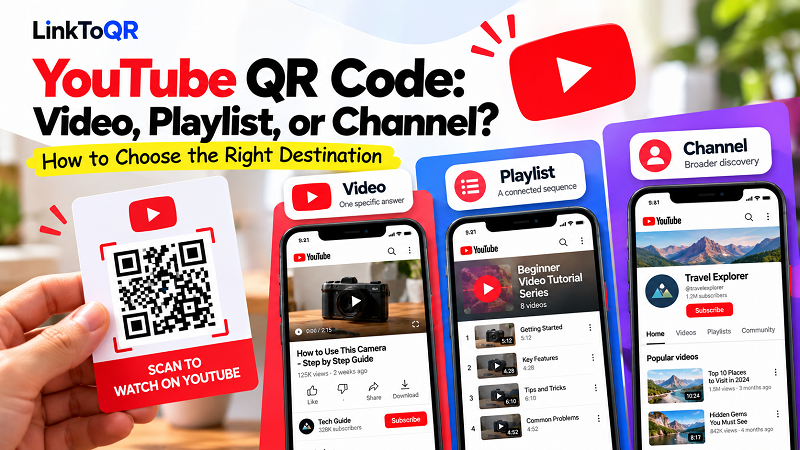
Three Destinations, Three Different Jobs
Think of the choice this way:
Video = one specific answer
Playlist = a connected sequence
Channel = broader discovery
That's the basic framework. The interesting part is knowing when each one makes sense.
Choose a Video When There Is One Clear Thing to Watch
A direct video link is usually the most focused option.
Imagine someone sees this next to a QR code:
Scan to watch the 2-minute setup guide.
There is no mystery about what should happen next. The visitor scans, the video opens, and the intended information is right there.
A specific video works particularly well when the content has a defined purpose, such as:
- Product demonstrations
- Setup instructions
- How-to tutorials
- Event recordings
- Short explanations
- Training clips
- Product introductions
The key idea is specificity.
If the printed material makes one promise, a single video can deliver exactly that promise without asking the visitor to make another decision.
Example: Product Packaging
Imagine a box containing a new kitchen appliance.
The package says:
Scan to see how to use it.
Sending the customer directly to the relevant tutorial makes sense.
Sending them to a YouTube channel and expecting them to find the tutorial themselves adds an unnecessary step.
The customer didn't ask to explore your content library. They asked, in effect, “Show me how this works.”
Give them the answer.
Choose a Playlist When One Video Isn't Enough
Now change the scenario.
Suppose a company has created six videos explaining how to use, maintain, troubleshoot, and get more from a product.
A single video can only cover part of the journey.
That's where a playlist becomes more useful.
A playlist works when the content has a relationship or sequence:
Video 1 → Video 2 → Video 3 → Video 4
This is particularly useful for:
- Courses
- Training programs
- Product education
- Multi-step tutorials
- Onboarding
- Series-based content
- Educational resources
The important distinction is that a playlist isn't simply “a page with more videos.”
It can create a guided content journey.
Example: Online Course
Imagine a printed workbook for a beginner photography course.
The QR code says:
Scan to watch the complete photography lesson series.
A playlist is a natural fit because the visitor isn't looking for one isolated answer. They're entering a sequence.
The destination should support that intention.
Choose a Channel When Discovery Is the Point
A YouTube channel serves a different purpose.
Instead of saying:
“Watch this.”
You're effectively saying:
“Come explore what we have.”
That's a much broader invitation.
A channel can make sense for:
- Creators
- Brands
- Businesses
- Media publishers
- Educational organizations
- Communities with a large video library
For example, a creator might put a QR code on a business card with:
Explore my videos on YouTube
That message doesn't promise one particular piece of content. It invites discovery.
In that case, sending someone directly to a single video could actually be too narrow.
The destination should reflect the level of exploration you want to encourage.
The 10-Second Decision
If you're stuck between the three options, ask yourself these questions in order.
Question 1: Does the person need one specific piece of information?
Yes → Video
Example:
“Watch how to install the filter.”
Don't make the visitor hunt for it.
Question 2: Do they need several related videos?
Yes → Playlist
Example:
“Watch our complete beginner's guide.”
The sequence matters more than any individual video.
Question 3: Do you want them to explore your content?
Yes → Channel
Example:
“Discover more tutorials from our team.”
Now browsing is part of the experience.
That's the entire decision tree.
You don't need a complicated strategy document. You just need to understand the job your QR is supposed to perform.
The Printed Message Should Give You the Answer
Here's a useful trick: write the CTA before choosing the destination.
Try completing this sentence:
“After scanning, I want the visitor to…”
If you finish it with:
“…watch this specific tutorial.”
→ Video.
“…go through our complete training series.”
→ Playlist.
“…see what else we publish.”
→ Channel.
This approach reverses the usual workflow.
Instead of starting with a URL and asking what QR you can make from it, start with the desired user action and work backward.
That usually produces a much cleaner experience.
What Happens When the Destination Is Too Broad?
Broad isn't always better.
Imagine a customer sees:
Scan for product instructions
They scan and land on a company's YouTube channel with dozens of videos.
Now they have to:
- Read the channel page
- Search for the product
- Identify the right video
- Open it
- Start watching
The QR code has technically done its job.
The customer experience hasn't.
Every additional decision introduces friction.
This is why a direct video is often better when the intended action is highly specific.
The opposite can also happen.
Imagine a creator puts a QR code on a conference badge saying:
Watch my latest tutorial
but the QR opens the entire channel.
The visitor now has to figure out which video is “the latest tutorial.”
Again, the destination and the promise don't line up.
Don't Forget the Six-Month Test
Here's a question worth asking before putting a YouTube QR code on something permanent:
Will this destination still make sense months from now?
A direct video can become outdated.
Maybe the product changes. Maybe a tutorial is replaced. Maybe the video is made private or removed.
A playlist can evolve as new videos are added, which can be useful for long-lived educational content.
A channel naturally changes over time, which makes it suitable for ongoing discovery but potentially less precise.
The right destination therefore depends not only on what you want people to see today, but also on how long the physical QR material will remain in circulation.
A temporary event poster and permanent product packaging don't necessarily deserve the same QR strategy.
Three Real-World Scenarios
Let's make the difference concrete.
Scenario A: A New Product
A company launches a coffee machine and wants customers to learn how to set it up.
Printed CTA:
Scan to watch the setup guide.
Destination: Video
The customer has one immediate job. Give them one immediate video.
Scenario B: A Training Program
A company creates a collection of lessons covering product operation, maintenance, troubleshooting, and advanced features.
Printed CTA:
Scan to access the complete training series.
Destination: Playlist
The customer needs a connected group of videos rather than a single answer.
Scenario C: A Creator's Business Card
A video creator meets people at an industry event and wants them to discover their work.
Printed CTA:
Explore my YouTube channel.
Destination: Channel
The goal isn't one particular video. Discovery is the point.
Notice how the QR itself barely changes.
The intention behind the scan is what changes.
What If You Have Multiple Good Videos?
This is where things can get tempting.
You might have three videos that all seem relevant, so why not send people to whichever one looks best?
Because “relevant” isn't necessarily the same as “right.”
If the user has one specific problem, choose the video that solves it.
If the videos form a logical sequence, build the experience around the playlist.
If there isn't a specific starting point and the purpose is broader discovery, the channel may be appropriate.
Don't make the user decide what you should have decided for them.
Your CTA and Your Destination Should Agree
Think of the CTA and destination as a handshake.
They should fit.
| Printed CTA | Natural destination |
|---|---|
| Watch the setup guide | Specific video |
| See how to install it | Specific video |
| Complete the tutorial series | Playlist |
| Watch all five lessons | Playlist |
| Explore our YouTube videos | Channel |
| Discover more from our brand | Channel |
This isn't an absolute rule. Context matters. But it gives you a useful starting point when deciding where the QR should lead.
The more specific the promise, the more specific the destination should usually be.
Test the Destination Before You Generate the QR
Don't wait until the QR is printed to discover that the wrong YouTube page was selected.
Open the intended URL on a phone.
Then ask:
Does the content appear immediately?
Can the visitor understand why they were sent here?
Is the video public and available?
Does the CTA still make sense?
Would someone who knows nothing about the campaign understand what to do next?
That last question is especially useful.
Creators and marketers tend to know too much about their own content. A first-time visitor doesn't.
If the experience only makes sense because you already know what you're looking for, simplify it.
Choose the Destination Before the Generator
Once you've decided between a video, playlist, and channel, creating the QR is straightforward. A youtube qr code generator can turn the chosen URL into a scannable code, but the generator isn't what determines whether the experience is useful.
That decision was made earlier.
The real workflow is:
Audience need → desired action → YouTube destination → QR code → physical placement
Not:
YouTube link → QR → figure out the experience later.
That small change in thinking can prevent a lot of unnecessary friction.
The Best Destination Is the One That Removes a Decision
A QR code is at its best when the person scanning it doesn't have to think about what happens next.
If they need one answer, take them to one video.
If they need a learning sequence, give them the playlist.
If they are there to discover your content, let them explore the channel.
Simple.
The QR code itself is only the shortcut. The destination is where the shortcut takes them.
And when those two pieces are designed together, scanning feels less like “using a QR code” and more like simply getting where you wanted to go.