- The QR Code Can Work Even When the Video Doesn't
- Four Situations That Can Turn a Printed QR Code Into a Dead End
- 1. Product Packaging and Instruction Cards
- 2. Printed Manuals and Training Materials
- 3. Event Displays and Promotional Materials
- 4. Retail Displays and In-Store Signage
- What You Can and Cannot Fix After Printing
- Build a Content Maintenance Policy Before the First Print Run
- Assign an Owner to Every Destination
- Maintain a QR Destination Register
- Test Access From a Real Viewer’s Perspective
- Recheck Before Reprinting or Reusing Materials
- Prepare a Backup for Essential Information
- A Risk Matrix for YouTube QR Campaigns
- Before You Publish Another YouTube QR Code
Imagine printing 5,000 product inserts, shipping them across the country, and then discovering that the YouTube tutorial behind your QR code is no longer available. The packaging looks great, the code scans perfectly, but customers land on a dead end. Not exactly the seamless experience you had in mind.
This is the hidden risk of connecting printed materials to online video content: the QR code can remain physically intact while the destination becomes useless. A code printed today may be scanned weeks, months, or even years later. If the video changes in the meantime, the experience can fall apart without anyone touching the printed material.
The good news? You don't need to stop using YouTube QR codes. You need a smarter way to manage the content behind them.
The QR Code Can Work Even When the Video Doesn't
A QR code is essentially a machine-readable way to store information, often a URL. When someone scans it, their phone reads that information and attempts to open the destination. The code itself doesn't automatically know whether the video is still available, relevant, or accessible to the person holding the phone.
That distinction matters. A successful scan only proves that the phone can read the code. It doesn't guarantee that the intended video will play.
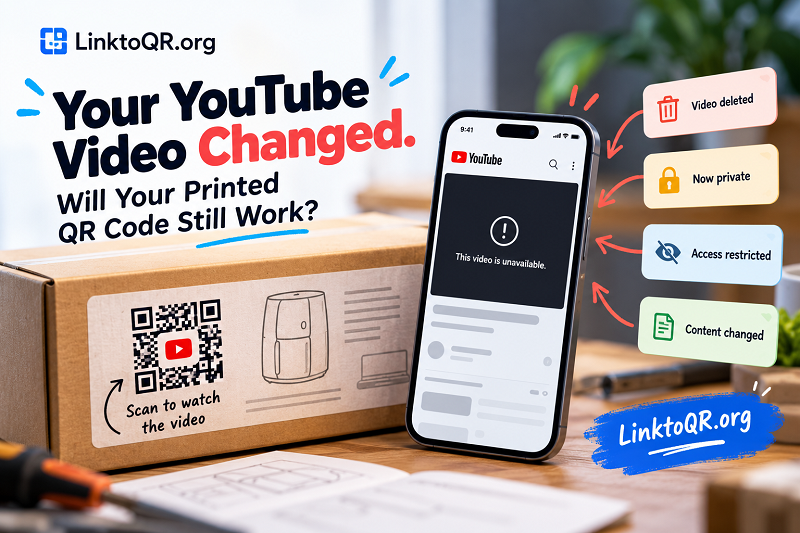
Consider a QR code printed on a product instruction card. The code points to a YouTube video demonstrating how to assemble the product. Later, the video owner removes it, changes its visibility, or replaces it with a different tutorial under a new URL. The printed code still contains the original address, so the customer's experience depends on what happens at that destination.
There are several ways this can go wrong:
- The video is deleted. The original destination is no longer available.
- The video becomes private. People without the required access may be unable to watch it.
- The video has viewing restrictions. Certain users or devices may encounter access limitations.
- The content changes. The link still opens, but the video no longer answers the question that brought the viewer there.
These situations require different fixes. Reprinting a QR code won't restore a deleted video, and changing a video's visibility won't correct an incorrect URL. Before taking action, identify exactly what changed.
Four Situations That Can Turn a Printed QR Code Into a Dead End
The impact of an unavailable video depends on where the QR code appears and what the viewer expects to find. A broken link on a casual social post is one thing. A broken link on packaging shipped to thousands of customers is a different headache entirely.
1. Product Packaging and Instruction Cards
Manufacturers often use QR codes to connect customers with assembly demonstrations, operating instructions, maintenance tips, or troubleshooting videos. This approach keeps printed materials compact while making more detailed help available online.
The problem starts when the video becomes unavailable after the product has left the warehouse. Customers may contact support, return products they cannot use correctly, or search for unofficial instructions that don't match the item they purchased.
For product-related content, choose a video that your organization can maintain and assign someone responsibility for keeping it accessible. If the instructions are essential to safe or correct use, consider providing a reliable written alternative rather than making the video the only source of guidance.
2. Printed Manuals and Training Materials
A QR code in a manual or training document may direct employees, customers, or contractors to a demonstration. If the video is restricted to a particular account or organization, a person scanning the code on a different device may be locked out.
This problem is especially frustrating when a document is distributed beyond its original audience. The person who created the material may have access to the video and assume everyone else does, too.
Test access from a device that isn't signed in to the content owner's account. If the material is intended for a private audience, verify the required permissions and communicate them clearly.
3. Event Displays and Promotional Materials
Conference banners, trade show displays, brochures, and event handouts can remain in circulation long after a campaign ends. A QR code might direct visitors to a product demonstration or recorded presentation, but the associated video could later be removed or replaced.
The risk isn't limited to a completely broken link. The video might still play while featuring outdated pricing, an expired offer, an old product model, or messaging that no longer represents the business.
Before reusing old event materials, check both availability and relevance. A working link is not necessarily a useful link.
4. Retail Displays and In-Store Signage
A retail display might encourage shoppers to scan a QR code to see a product demonstration. If the marketing team updates its YouTube content but leaves the original printed display in place, shoppers could receive outdated information.
This is a coordination problem as much as a technical one. Marketing may know that a video has changed, while store teams continue using existing signage. Without a clear process for reviewing and replacing materials, the mismatch can persist for months.
Keep a record of where each campaign's QR codes appear and include those locations in the update process whenever the destination changes.
What You Can and Cannot Fix After Printing
Once a QR code has been printed, your options depend on the information encoded in it. Understanding that limitation before a campaign launches can save you from expensive surprises.
If the code contains a direct YouTube URL, changing the destination usually requires a new code. A static QR code does not automatically update when you upload another video or change the original video's settings. The encoded URL remains the same unless the destination itself continues to serve the intended content.
However, not every video problem requires a new QR code.
| Problem | Practical response |
|---|---|
| Video is temporarily unavailable | Investigate the video's status and restore access if possible. |
| Video is private or restricted | Review visibility and permissions for the intended audience. |
| Video has been deleted | Restore it if possible or publish replacement content. |
| Replacement video has a different URL | Generate a new static QR code and replace printed materials where feasible. |
| Video still works but contains outdated information | Update the content or replace the linked material as appropriate. |
| The QR code points to an incorrect URL | Correct the destination and replace the code if necessary. |
There is one important distinction: some QR platforms offer editable destinations through a redirect or management system. Those codes can behave differently from static QR codes because the destination can be changed without altering the printed pattern. But that capability depends on the service and code type; it isn't an automatic feature of every QR code.
For a large print run, calculate the consequences of a destination change before deciding which approach to use. The right choice depends on how often your content changes, how long the printed materials will remain in circulation, and how much control you need after publication.
Build a Content Maintenance Policy Before the First Print Run
The easiest time to prevent a broken QR experience is before the code reaches a printer. That doesn't mean creating an elaborate system with endless paperwork. A simple, repeatable process is usually enough to make ownership clear and catch avoidable problems.
Assign an Owner to Every Destination
Each QR-linked video should have a person or team responsible for its availability and accuracy. That owner doesn't necessarily need to manage the QR design. Their job is to make sure the destination remains suitable for its intended purpose.
For a small business, one marketing coordinator might manage the entire process. A larger organization may assign responsibility to product, training, or regional marketing teams.
Maintain a QR Destination Register
Keep a basic record of every important printed QR campaign. Include the encoded URL, the corresponding video, the campaign or product name, the locations where the code appears, the responsible owner, and the date it was last checked.
This register becomes especially useful when a video needs to be replaced. Instead of guessing which packaging or brochures contain the old code, your team has a starting point for identifying affected materials.
Test Access From a Real Viewer’s Perspective
Don't rely exclusively on the account used to upload the video. Scan the printed code with an ordinary smartphone and verify that the destination opens as expected.
Check whether the video plays, whether the information matches the surrounding material, and whether the intended audience can access it. If the QR code appears on a physical product, test a sample of the actual printed material rather than relying only on the digital design file.
Recheck Before Reprinting or Reusing Materials
A destination that worked during the original print run may not remain suitable forever. Review the linked content before ordering a new batch of packaging, reusing an exhibition banner, or distributing updated manuals.
For long-lived materials, establish a reasonable review interval based on the importance of the content and how frequently it changes. A product safety tutorial deserves closer attention than a QR code on a temporary promotional flyer.
Prepare a Backup for Essential Information
If viewers need the content to operate a product, complete a task, or understand important instructions, don't let a single video become the only available source.
A written guide, accessible support page, or alternative instruction channel can reduce disruption if the video becomes unavailable. The backup should be genuinely useful, not merely a generic contact page that leaves the customer with the same unanswered question.
A Risk Matrix for YouTube QR Campaigns
Not every issue deserves the same response. A useful way to prioritize maintenance is to consider how accessible the video is, whether its information is still accurate, and what happens if a viewer cannot use it.
| Situation | Priority | Recommended action |
|---|---|---|
| Public video, accurate content, successful playback | Routine | Record the test and continue scheduled reviews. |
| Video has audience or permission restrictions | High | Verify access for the intended viewers and devices. |
| Video is deleted or the destination is invalid | Urgent | Restore or replace the content, then determine whether the printed code must be replaced. |
| Video works but provides outdated information | High | Update the video or associated materials before further distribution. |
| Existing print materials contain an obsolete code | Depends on impact | Identify affected locations and prioritize replacement based on customer need and operational risk. |
These priorities are practical recommendations, not an official risk classification. A business should adjust them according to the consequences of failure. If a video contains critical operating instructions, for example, an unavailable destination deserves more attention than an expired promotional clip.
The key is to avoid treating every QR problem as a design issue. Sometimes the code is fine, and the content management process is what needs fixing.
Before You Publish Another YouTube QR Code
A little preparation can prevent a lot of unnecessary reprinting. Before approving a new campaign, confirm that the destination is correct, the video is available to the intended audience, and the content matches the promise made by the printed material.
Next, document who owns the video and where the printed code will appear. Decide how your team will respond if the destination changes, and keep an alternative source of information available when the content is important to the viewer.
If you're preparing a new campaign, use a youtube qr generator to turn your verified YouTube URL into a scannable code. Test the finished code on a phone before sending the design to print, and retain a record of the exact URL used.
A QR code may be a small part of a package, brochure, or display, but the experience behind it can shape how customers perceive your business. Treat the destination as an asset that needs ownership and maintenance, not a link you can forget about once the printer finishes the job.
The bottom line: A printed QR code can last for years, but the video behind it may change tomorrow. Build a simple maintenance process now, and your next campaign will be much better prepared for whatever happens after publication.