Buying something online is usually the easy part. The interesting moment comes after the box lands on your doorstep.
- The Box Is Not the End of the Customer Journey
- Think Beyond the Instruction Manual
- The QR Code Should Solve a Problem, Not Create Another One
- Where Should an Amazon Product QR Code Go?
- What About the Amazon Product Page?
- A Better Post-Purchase Experience Doesn't Need to Be Complicated
Maybe the product needs assembly. Maybe there is a five-minute setup process that makes absolutely no sense from the tiny instruction sheet. Maybe the manufacturer has a useful video, a digital manual, or a care guide sitting somewhere online—but finding it means opening Amazon again, digging through an order history, searching the product name, and hoping the right page appears.
That is a surprisingly clunky experience for something that could be solved with one scan.
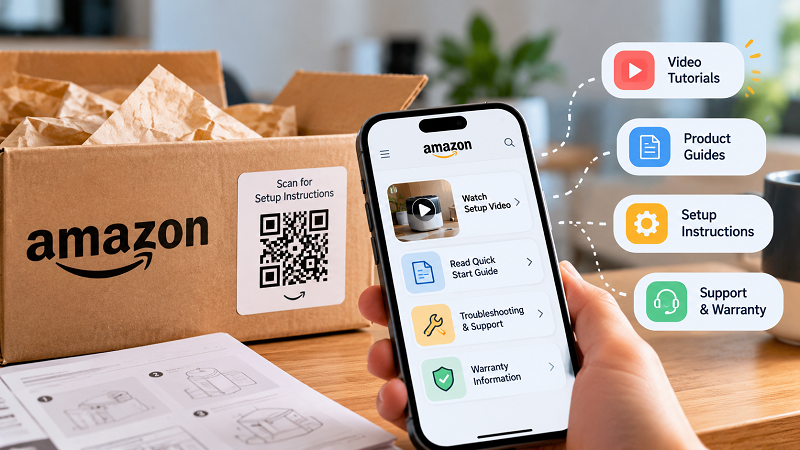
For brands selling products through Amazon, a QR code printed on packaging, an insert card, or a quick-start guide can create a much cleaner bridge between the physical product and useful online information. The trick is not simply putting a QR code on a box. The real question is: what happens after the customer scans it?
The Box Is Not the End of the Customer Journey
A lot of marketing stops at the purchase. The customer clicks Buy Now, the order ships, and the job feels finished.
From the customer's perspective, though, the journey has just changed phases.
They now need to understand the product, set it up, use it correctly, maintain it, or figure out what to do when something goes wrong. This is where small moments of friction can quickly become annoying. A customer who cannot figure out how to assemble a product does not want to hunt around the internet for a PDF. Someone trying to understand a complicated feature probably does not want to type a long product name into a search bar either.
A QR code gives that customer a shortcut.
Instead of saying “go to our website, find Support, choose your product, then open the guide,” a printed message can simply say Scan for setup instructions. The QR code handles the boring part.
That difference may sound tiny. In practice, tiny friction is exactly the stuff customers remember.
Think Beyond the Instruction Manual
The most obvious destination for a QR code is a digital manual, but that is only scratching the surface.
A product could point customers toward a short installation video, a troubleshooting page, maintenance instructions, warranty information, a recipe collection, replacement-part information, or a page containing several resources in one place.
The best destination depends entirely on what customers are likely to need immediately after opening the package.
For example, imagine selling a kitchen appliance. The printed card does not necessarily need to send customers to the product listing. A much more useful destination could be a page with three obvious choices: Watch the setup video, Read the quick-start guide, and Get cleaning instructions.
That feels less like marketing and more like actual help.
And that distinction matters. Customers are generally much more receptive to a QR code when the benefit is obvious before they scan it.
The QR Code Should Solve a Problem, Not Create Another One
Here is where some packaging QR codes go wrong: the code exists, but the experience behind it is weak.
A customer scans it and lands on a generic homepage. Now they have to search again. Or the page is difficult to navigate on a phone. Or the promised video has disappeared. Or the QR code is printed so small that the camera struggles to recognize it.
The technology is not really the problem. The journey is.
Before printing a QR code on thousands of product inserts, test the entire sequence on an actual phone. Scan it from the distance customers will use. Open the destination over a normal mobile connection. Check that the page loads quickly. Make sure the important information is immediately visible.
Then ask one brutally simple question: If I were holding this product right now, would this page actually help me?
If the answer is no, redesign the destination before worrying about the QR graphic.
Where Should an Amazon Product QR Code Go?
There is no universal winner because packaging varies wildly. A large box gives you plenty of space, while a tiny accessory package does not.
Common options include a quick-start card, instruction sheet, product packaging, warranty information card, or a small sticker placed somewhere appropriate.
The placement should make sense in context. If the customer sees the QR code immediately after opening the box, the accompanying message can focus on getting started. If they find it inside a manual, the message can point toward additional resources.
The copy around the code is just as important as the code itself. “Scan Me” is technically understandable, but it gives the customer no reason to care. “Scan for the 2-minute setup video” is much more useful because the value is clear before the camera opens.
That little sentence can make the difference between a QR code people ignore and one they actually use.
What About the Amazon Product Page?
Sometimes the most logical destination really is the Amazon product page. A customer may want to revisit specifications, see compatible accessories, check product information, or share the listing with someone else.
In those situations, an amazon qr code can turn a printed product experience into a quick digital entry point. The important part is matching the destination to the customer's immediate need rather than automatically sending every scan to the same page.
There is also a practical reason to keep the experience straightforward: printed materials are hard to change. A bad webpage can be updated tomorrow. A badly designed package insert might sit inside thousands of boxes for months.
So test first, print later.
A Better Post-Purchase Experience Doesn't Need to Be Complicated
The smartest packaging experiences are often surprisingly simple.
A customer opens the box. They see a short message. They scan. The right information appears on their phone. Problem solved.
No account creation. No five-step navigation maze. No hunting through search results.
That is the real opportunity with QR codes on physical products. They are not interesting because scanning a square pattern feels futuristic—it doesn't. They are useful because they remove a small piece of friction at exactly the moment someone needs help.
For Amazon sellers and product brands, that makes the QR code less of a marketing decoration and more of a practical customer-service shortcut.
And honestly, that is probably where QR codes work best: not when they try to impress people, but when they quietly make something easier.