You have probably experienced this one.
- The Problem Isn't Meeting People
- Build the Scan Into the Conversation
- Your Name Badge Might Be More Useful Than You Think
- Don't Send People on a Scavenger Hunt
- Not Every Networking Situation Needs a QR Code
- Make It Look Like Part of the Experience
- The Best Networking Follow-Up May Happen Before You Leave
You meet someone at a conference and have a genuinely good conversation. They work in an interesting industry. Maybe there is a potential partnership. Maybe they have a skill you need. Maybe you simply think, “This is someone I should stay in touch with.”
Then comes the classic ending: “Let's connect on LinkedIn.”
You exchange names, promise to look each other up later, shake hands, and move on.
Three hours later, you're standing in another room surrounded by 200 people trying to remember whether their last name had one “n” or two.
That is the weird little gap where networking opportunities disappear.
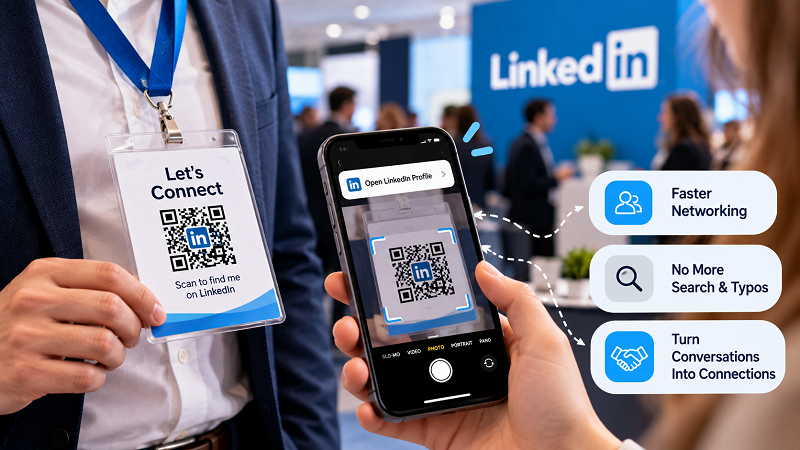
The Problem Isn't Meeting People
Modern networking events are full of opportunities to meet people. The difficult part is turning a five-minute conversation into an actual digital connection.
Searching someone's name on LinkedIn sounds easy until you consider how many people can share the same name. Add a company change, a common surname, an unfamiliar spelling, or a profile without a recognizable photo, and suddenly a simple connection becomes detective work.
Business cards solve part of the problem, but they create another one. You still have to manually type the information later. And if you collect twenty cards during a busy conference, there's a decent chance some will disappear into the mysterious black hole known as “my desk drawer.”
The best networking tools reduce the distance between “Nice to meet you” and “We're connected.”
That is where a QR code can fit surprisingly well.
Build the Scan Into the Conversation
The biggest mistake is treating a QR code like an advertisement.
Imagine walking up to someone and saying, “Here is my QR code. Please scan it.”
A little awkward.
Now imagine you are wrapping up a conversation and say, “Want to connect? You can just scan this.”
Much better.
The difference is context.
A QR code works naturally when it appears at the exact moment people are already thinking about exchanging contact information. It does not need a giant sign screaming for attention. It simply needs to be available when the conversation reaches that point.
That could be on a name badge, business card, speaker slide, booth display, event handout, or even a phone screen.
The goal is not to make the QR code the star of the show. The conversation is the star. The QR code just makes the next step ridiculously easy.
Your Name Badge Might Be More Useful Than You Think
Conference badges are interesting because they already sit in the perfect location: right in front of another person's eyes during a conversation.
Most badges contain a name, job title, company, and perhaps a sponsor logo. Adding a QR code can turn that static information into an interactive introduction.
Someone sees your name. You talk. They want to connect. They scan.
Done.
There is no need to interrupt the conversation while one person spells a LinkedIn username and the other tries to remember it.
For larger events, this can also work well for speakers and exhibitors. A speaker can place a QR code beside their name on the opening or closing slide. A booth team can put one on a small countertop sign. A consultant can include one on a printed leave-behind.
Different formats, same principle: make the connection available when interest is already there.
Don't Send People on a Scavenger Hunt
There is another detail that is easy to overlook.
Getting someone to scan is only half the job.
What happens next matters just as much.
If the QR code opens a page that takes forever to load, forces the visitor through several menus, or sends them somewhere unrelated, you've just replaced one annoying step with another.
For a networking QR code, the destination should be obvious. The person should immediately understand what they are looking at and what action to take.
If the purpose is connecting on LinkedIn, don't make visitors wander around your website first. If you want them to learn about your company before connecting, make that intention clear.
Think of the scan as a handoff. You have someone's attention for a few seconds. Don't make them work to figure out why they scanned.
Not Every Networking Situation Needs a QR Code
This is worth saying because QR codes are not magic seasoning that belongs on everything.
If you're having a relaxed one-on-one conversation and the other person already has LinkedIn open, simply exchanging profiles may be faster.
But QR codes become particularly useful when there is crowd pressure, limited time, or repeated introductions.
A conference might involve dozens of conversations in a single afternoon. A trade show booth may speak with hundreds of visitors. A speaker might have only a few minutes with people after a presentation.
Those are exactly the environments where eliminating one or two tiny steps can make a difference.
The question is not “Can I put a QR code here?”
The better question is “Will this remove friction from something people are already trying to do?”
Make It Look Like Part of the Experience
A networking QR code doesn't need to look like it was slapped onto a design five minutes before printing.
Give it enough breathing room. Make sure it remains easy to scan. Put a short, useful instruction next to it. And make the reason for scanning immediately obvious.
Instead of a lonely square sitting underneath a name, try something more conversational:
Let's connect → Scan to find me on LinkedIn
Or:
Met at the event? Let's stay connected.
That small amount of context gives the QR code a job.
It also makes the interaction feel less transactional. People aren't scanning an anonymous black-and-white pattern. They're continuing a conversation that has already started.
The Best Networking Follow-Up May Happen Before You Leave
Networking advice often focuses on what to do after an event: send a message, organize contacts, follow up within a few days, and so on.
Those things still matter.
But there is a simpler opportunity earlier in the process: make sure the contact is captured correctly in the first place.
When someone scans your LinkedIn profile while you're standing in front of them, there is much less room for the connection to get lost between the event and the follow-up.
And that is really the appeal of being able to generate linkedin qr code for networking. It turns an otherwise forgettable exchange of names into a quick action that can happen before either person walks away.
No searching. No spelling mistakes. No “I'll find you later.”
Just scan, connect, and get back to the conversation.
Because the point of networking was never collecting the most business cards in the room. It was meeting people worth remembering—and making it easy to stay connected.