- The Facebook Group Membership Funnel: Four Stages Where People Drop Off
- Stage 1: Scan – Did They Actually Reach Your Group?
- Stage 2: Discover – Do Visitors Understand Why They Should Join?
- Stage 3: Request to Join – Is the Membership Process Too Complicated?
- Stage 4: Approval and First Interaction – What Happens After They Join?
- A QR Scan Is Not a Membership Request
- The Membership Friction Audit: Find What's Pushing People Away
- Fix the Group Before Printing Another QR Code
- Turn Every Physical Touchpoint Into a Better Entry Point
- The 7-Point Facebook Group QR Conversion Check
- Stop Counting Scans. Start Building a Community.
You printed the QR code, put it on your posters, shared it at events, and maybe even displayed it at your store. People are scanning it. Great! But when you check your Facebook Group, the member count barely moves. What's going on?
Here's the uncomfortable truth: A scan doesn't automatically become a membership. Someone can scan your code, open your group, look around for five seconds, and disappear without ever clicking Join. That's not necessarily a QR code problem. It might be a conversion problem hiding somewhere along the membership journey.
If you're managing a Facebook community, stop looking at scans as the ultimate success metric. Let's figure out where potential members are slipping away and, more importantly, what you can do about it.
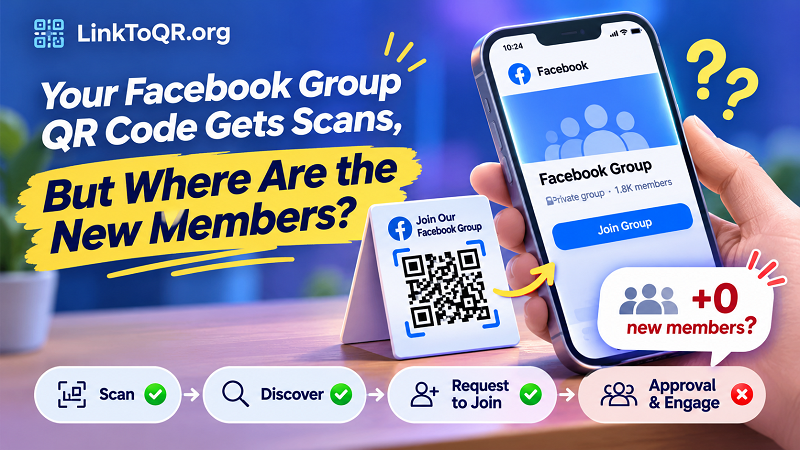
The Facebook Group Membership Funnel: Four Stages Where People Drop Off
Think of joining a Facebook Group as a journey with four distinct stages. Every stage has a different job, and every unnecessary obstacle gives visitors another reason to leave.
Stage 1: Scan – Did They Actually Reach Your Group?
The first hurdle seems obvious: someone scans the code and expects to land on your Facebook Group. But what if the destination is outdated, the link is incorrect, or the group has access restrictions?
A QR code can look perfectly fine while leading people somewhere they cannot access. This becomes especially frustrating when the code has already been printed on hundreds of flyers or distributed across multiple locations.
What to check:
- Scan the code using different smartphones and QR scanning apps.
- Confirm that it opens the intended Facebook Group.
- Test the destination while logged out and while logged into a different Facebook account.
- Check whether the group is still active and accessible to your intended audience.
Don't assume a code works just because your phone opens it. Your experience as an administrator may be completely different from that of a first-time visitor.
Stage 2: Discover – Do Visitors Understand Why They Should Join?
Getting someone to your group is only half the battle. Once they arrive, they need a compelling reason to stay.
Imagine scanning a QR code labeled "Join Our Community" and landing on a group with a vague name, an empty-looking feed, an outdated cover image, and a description that says almost nothing. Would you join? Probably not.
People don't join groups simply because a QR code tells them to. They join because they see something valuable on the other side.
Make the group's purpose obvious within seconds. Explain who the community is for, what members can expect, and why joining is worth their time.
For example, instead of writing "Welcome to our customer group," try something more specific: "Join local food lovers for exclusive product updates, community discussions, special offers, and behind-the-scenes stories."
Specificity beats generic promises every time.
Stage 3: Request to Join – Is the Membership Process Too Complicated?
Some Facebook Groups require administrator approval, membership questions, or agreement to community rules. These features can help protect a community, but unnecessary friction can discourage legitimate visitors.
Picture someone scanning your code during a busy shopping trip. They reach the group, click Join, and encounter several questions that feel more like a job application than a community invitation. There's a good chance they'll postpone the process and never return.
That doesn't mean you should remove every membership requirement. Instead, make sure each requirement serves a real purpose.
Keep questions relevant, avoid asking for unnecessary personal information, and explain why certain details are needed. If approval is required, let visitors know what happens next.
A simple message such as "New members are reviewed by our admin team. Please allow some time for approval" can prevent confusion and set realistic expectations.
Stage 4: Approval and First Interaction – What Happens After They Join?
Here's a conversion leak that many administrators overlook: people successfully request access, but their journey stalls while waiting for approval.
If membership requests sit unanswered for days, potential members may lose interest. Even after approval, a new member who encounters an inactive community and no clear welcome message may never participate.
Your onboarding experience matters. Consider preparing a welcome post that introduces the community, explains the rules, highlights useful resources, and invites newcomers to participate in a simple discussion.
The goal isn't just to increase the member count. It's to help new members feel that joining was a worthwhile decision.
A QR Scan Is Not a Membership Request
Let's clear up a common measurement mistake: counting scans and counting new members are two completely different things.
A QR code campaign can generate plenty of traffic without producing meaningful community growth. Someone might scan the code out of curiosity, open the group, read the description, and leave. Another person might request membership but never receive approval.
If you only monitor scan numbers, you'll never know where the real problem is.
A more useful measurement framework separates the journey into individual actions:
| Metric | What It Tells You |
|---|---|
| QR scans | How many times the code was scanned |
| Group visits | How many visitors reached the destination |
| Join requests | How many people attempted to join |
| Approved members | How many requests were accepted |
| New member engagement | Whether newcomers actually participate |
Not every campaign will have access to every metric. Facebook's available group insights and external tracking capabilities can vary, so avoid assuming that a standard group invitation link automatically reveals every step.
For better measurement, use unique campaign links where appropriate, compare membership growth against campaign dates, and record approval activity. The more clearly you separate these stages, the easier it becomes to identify what's working.
The Membership Friction Audit: Find What's Pushing People Away
Instead of randomly changing your QR design, diagnose the experience first. Use this table to identify possible problems and practical fixes.
| What You Notice | Possible Cause | Recommended Action |
|---|---|---|
| Visitors report an error | Incorrect destination or access restrictions | Verify the group URL and permissions |
| Scans increase but membership doesn't | Weak group presentation | Improve the description and value proposition |
| Many requests remain pending | Slow administrator response | Establish a regular approval routine |
| Visitors abandon membership questions | Too many unnecessary questions | Simplify the application process |
| New members never participate | Poor onboarding | Create a welcome post and engagement prompts |
| People cannot find the group again | Confusing or inconsistent promotion | Use clear calls to action and recognizable branding |
One important rule: Don't change five things at once. Fix one major obstacle, observe the results, and then move to the next. Otherwise, you'll have no idea which improvement actually made a difference.
Fix the Group Before Printing Another QR Code
When a campaign underperforms, the instinct is often to redesign the QR code, print a bigger poster, or move the code somewhere more visible. Sometimes that helps. But if the destination experience is broken, you're simply sending more people into the same problem.
Before investing in another print run, work through these improvements.
1. Review your group settings. Check whether the group is public or private, who can find it, and what restrictions apply to potential members. Make sure the settings match your intended audience.
2. Rewrite the group description. Explain the community's purpose in plain language. Visitors should understand what they gain from joining without having to investigate ten different posts.
3. Simplify membership questions. Ask only for information that helps you manage the community. If a question doesn't serve a clear purpose, consider removing it.
4. Establish an approval routine. Assign responsibility for reviewing pending requests. A simple daily check can prevent legitimate requests from getting buried.
5. Prepare a welcome experience. Create a pinned introduction or welcome post with community guidelines, useful links, and a simple first action for new members.
6. Keep the community active. An empty or neglected group sends the wrong message. Publish useful discussions, answer questions, and give members a reason to return.
A QR code is an entry point, not a substitute for a well-managed community. Make sure there's something worth discovering after the scan.
Turn Every Physical Touchpoint Into a Better Entry Point
Your Facebook Group invitation shouldn't exist only on a computer screen. Think about where your target audience already spends time.
A local business might display a QR code at the checkout counter, on product packaging, or on a promotional flyer. A fitness instructor might include one on membership cards or inside a studio. A school club could place one on event posters, while an online seller might add it to order inserts.
The important part is matching the placement with the right audience and giving people a clear reason to scan.
When preparing your campaign, use a dedicated qr fb solution to turn the correct Facebook destination into a scannable code. Double-check the destination before distributing it, then test the finished code on multiple devices.
Your call to action also deserves attention. "Scan Here" is functional, but it doesn't communicate much value. Try messages that explain what visitors will get:
- Scan to Join Our Facebook Community
- Get Exclusive Updates – Join Our Group
- Connect With Local Members
- Join the Conversation
- Scan to Access Community News
A specific invitation makes the next step feel much more obvious.
Finally, remember that QR code placement matters. A code hidden in a corner, printed too small, or surrounded by visual clutter can easily be overlooked. Give it enough space, maintain strong contrast, and position it where people can comfortably scan it.
The 7-Point Facebook Group QR Conversion Check
Before launching your next campaign, run through this quick audit. It takes only a few minutes and can save you from distributing hundreds of invitations that lead nowhere.
Correct destination: The code opens the intended Facebook Group.
Clear group description: Visitors immediately understand the community's purpose.
Accessible membership settings: Your target audience can actually request access.
Reasonable membership questions: The process doesn't feel unnecessarily complicated.
Active administrator approval: Pending requests are reviewed consistently.
Clear welcome experience: New members know what to do after joining.
Effective QR placement: The code is visible, readable, and accompanied by a useful call to action.
If you can't confidently check every box, there's room to improve before spending more money on promotion.
Stop Counting Scans. Start Building a Community.
A successful Facebook Group campaign isn't measured by how many people point their cameras at a QR code. It's measured by how many people discover something valuable, decide to join, and eventually become active members.
When membership growth falls behind scan activity, don't immediately blame the code. Look at the entire journey, from the first scan to the first meaningful interaction.
Remove unnecessary obstacles, communicate your community's value clearly, make membership easier to complete, and give newcomers a reason to stay.
Because at the end of the day, a thousand scans mean very little if nobody sticks around. Build a better entry experience, and those scans have a much better chance of turning into a real community.