- A New Facebook Username Can Leave Old Marketing Materials Behind
- The QR Code Problem Nobody Notices During a Rebrand
- Where Your Old Facebook QR Codes Might Still Be Circulating
- Business Cards and Company Profiles
- Product Packaging and Labels
- Storefront Signs and Promotional Displays
- Flyers, Brochures, and Event Materials
- Digital PDFs and Downloadable Catalogs
- What to Do Before and After Changing Your Facebook Username
- Can You Keep the Same Printed QR Code After a Facebook URL Change?
- Static QR Codes: The Original URL Stays Embedded
- Redirect-Based QR Codes: More Flexibility for Future Changes
- A Facebook Rebrand Shouldn't Break Your Offline Marketing
A rebrand feels exciting. You've finally secured a cleaner Facebook username, updated your business identity, refreshed your profile picture, and announced the change to your audience. Everything looks sharp and ready for a fresh start. But there's one tiny detail that could turn your marketing cleanup into an expensive headache: the QR codes you've already printed.
Think about it. Your old Facebook link might be sitting on thousands of business cards, product packages, restaurant menus, promotional posters, and brochures. Customers don't know you've changed anything. They simply scan the code, expecting to find your business. If that old destination no longer works, your carefully designed marketing materials suddenly become a collection of dead ends.
And here's the catch: changing a Facebook username doesn't automatically update the QR codes you've distributed. Your digital rebrand and your physical marketing materials are two separate things. If you don't connect those dots, customers may be the first ones to discover the problem.
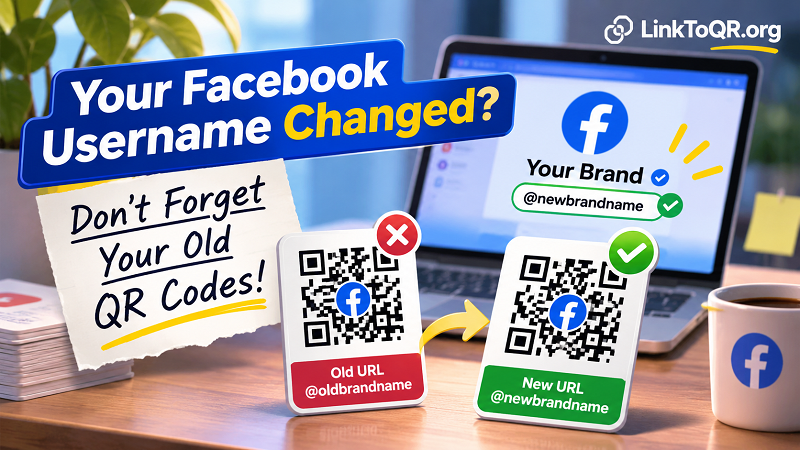
A New Facebook Username Can Leave Old Marketing Materials Behind
Facebook Page names and usernames serve different purposes. Your Page name is the public-facing identity people see when they visit your business profile. Your username is the unique identifier associated with your Page URL.
For example, imagine your company previously used this address:
facebook.com/oldbrandname
After a rebrand, you change your username to:
facebook.com/newbrandname
Your business now has a more relevant URL that matches its updated identity. Great. But what happens to the old address?
The answer depends on Facebook's current URL and redirection behavior. You shouldn't assume that every previous address will automatically send visitors to the new Page. An old link may stop working, display an unavailable destination, or fail to take customers where you intended.
This becomes particularly important when your old username has been used across multiple marketing channels. Updating the link in your website's navigation is relatively easy. Finding every printed item that contains the previous address? That's a completely different challenge.
The QR Code Problem Nobody Notices During a Rebrand
Here's where things get interesting.
A QR code isn't a magical window that automatically knows your latest Facebook address. A static QR code stores specific information, usually a URL, directly inside its pattern of black and white modules.
When you generate a QR code using your old Facebook address, that exact URL becomes part of the code's data. The image doesn't maintain a live connection to your Facebook settings, and it doesn't receive notifications when you change your username.
In other words, your Facebook Page can move on while your QR code remains stuck in the past.
For businesses using a QR code FB link in printed promotions, this distinction matters more than it might seem. A customer could scan an old code successfully, only to land on an outdated or inaccessible Facebook address. The scanning process works perfectly, but the destination creates the problem.
That's an especially frustrating situation because the QR code itself may look completely normal. Nothing appears damaged, the camera recognizes it instantly, and the phone opens a browser or Facebook app. Yet the customer still can't reach the business Page.
A successful scan doesn't necessarily mean a successful customer journey. The destination matters just as much as the code itself.
Where Your Old Facebook QR Codes Might Still Be Circulating
Not every business can replace outdated marketing materials overnight. Some printed assets may remain in circulation for months, while others could be sitting in warehouses, retail locations, or customers' homes.
Here are five places worth checking before you consider your rebrand complete.
Business Cards and Company Profiles
Business cards have a surprisingly long lifespan. Someone might keep yours in a wallet, place it on a desk, or save it for a future purchase. If your old Facebook QR code is printed on the back, changing your username won't update that physical card.
For small businesses, freelancers, and sales teams, this can quietly reduce the value of networking efforts. Someone who wants to check your latest work may end up facing an outdated link instead.
Product Packaging and Labels
Packaging deserves extra attention because it can travel much farther than your marketing team expects. A product might be sitting on a supermarket shelf, inside a distributor's warehouse, or already in a customer's kitchen.
If your Facebook QR code appears on the packaging, replacing it means more than editing a digital file. You may need to coordinate with manufacturers, distributors, and retail partners.
Storefront Signs and Promotional Displays
Think about QR codes printed on counter displays, window stickers, standees, and banners. These materials are designed to stay visible for long periods, which makes them easy to overlook during a rebrand.
A customer standing right in front of your store might scan the code expecting to see current promotions. Sending that person to an outdated destination creates unnecessary friction at the exact moment they're interested in your business.
Flyers, Brochures, and Event Materials
Promotional materials are often printed in bulk. A company might distribute thousands of flyers during an event, campaign, or product launch. Even after the campaign ends, some copies can remain in circulation.
If your Facebook username changes afterward, those materials don't magically become obsolete. People may continue discovering and scanning them long after your marketing team has moved on.
Digital PDFs and Downloadable Catalogs
Not every outdated QR code is printed on paper. Sales presentations, product catalogs, downloadable brochures, and PDF documents can also contain old Facebook links.
These files are particularly tricky because they may be stored on third-party websites, shared through email, or downloaded by customers. You might update the original document without knowing how many older copies are still being used.
What to Do Before and After Changing Your Facebook Username
A Facebook username change shouldn't be treated as an isolated profile update. It's part of a larger brand transition, and your marketing assets need to be included in the process.
Before making the change, start by identifying where your current Facebook URL appears. Check your website, social media profiles, printed materials, product packaging, downloadable documents, email signatures, and advertising campaigns. You don't need an elaborate enterprise system to do this. Even a simple spreadsheet can help you track each asset, its location, and whether it needs updating.
Next, confirm the new Facebook Page URL. Open it in a browser, test it on a mobile device, and make sure it directs visitors to the correct Page. Don't rely exclusively on the fact that you're already logged into Facebook. Test the experience as an ordinary visitor would.
Once the username change is complete, move through your asset list. Update digital materials that you can control immediately, then prioritize physical materials based on how widely they're distributed and how long they'll remain in use.
For example, replacing a QR code on a storefront sign may be more urgent than updating a brochure that's no longer actively distributed. Meanwhile, product packaging already in retail channels may require a longer transition plan.
Finally, don't stop after updating the artwork. Scan the old and new QR codes using different phones and verify their actual destinations. A quick test today can prevent a surprisingly awkward customer experience tomorrow.
Can You Keep the Same Printed QR Code After a Facebook URL Change?
This is probably the question every business owner wants answered before ordering another batch of printed materials.
The answer depends on how the original QR code was created.
Static QR Codes: The Original URL Stays Embedded
A static QR code contains its destination directly in the encoded data. If you generated it using your previous Facebook URL, changing your Facebook username won't rewrite the information stored inside the existing image.
There is no automatic update mechanism built into the code itself.
If the old Facebook address no longer leads to the intended destination, the practical solution is to generate a new QR code using the updated URL. You'll then need to replace the old image wherever it appears.
This is why checking your destination before printing matters. A QR code might be inexpensive to generate, but replacing thousands of printed copies certainly isn't.
Redirect-Based QR Codes: More Flexibility for Future Changes
Some QR code services use an intermediate URL instead of encoding the final destination directly. When someone scans the code, they first visit that intermediate address, which then redirects them to the selected destination.
If the service supports editable destinations, you can change the final Facebook URL without changing the QR code image itself.
This approach offers more flexibility for businesses that frequently update campaigns, social media destinations, or promotional landing pages. However, it depends on the redirect service remaining active and the destination-editing feature continuing to be available under your plan.
There is also an important distinction: not every QR code described as dynamic offers the same functionality. Check the provider's terms, subscription requirements, and redirect behavior before relying on it for long-term marketing materials.
A Facebook Rebrand Shouldn't Break Your Offline Marketing
Changing a Facebook username takes only a few minutes. Recovering from outdated marketing materials can take considerably longer.
The smartest approach is to treat every QR code as part of your brand's digital infrastructure. When your business identity changes, your website, social profiles, printed materials, and QR destinations should be reviewed together.
You don't necessarily need to replace every old asset immediately. What matters is knowing where those assets exist, understanding which destinations they contain, and having a realistic plan for updating them.
One final piece of advice: don't wait for a customer to tell you that your QR code is broken. Test the codes yourself, especially after major changes to your social media accounts.
Your brand deserves a fresh start. Your customers deserve a working link. Make sure the two stay connected.