- When One Channel Starts Serving Too Many Purposes
- Start With the Audience, Not the Upload History
- Build Content Paths Instead of a Video Pile
- Where a YouTube Channel QR Code Fits Into the Strategy
- When Should You Send People to the Channel—and When Should You Not?
- Make Your Channel Easier to Navigate as It Grows
- A Better Channel Experience Starts Before the Next Upload
A YouTube channel can start with a simple mission: publish helpful videos and build an audience. Then reality kicks in. Your business adds product tutorials, customer testimonials, behind-the-scenes clips, training videos, and promotional content. Suddenly, your channel feels less like a carefully planned library and more like a warehouse where everything is technically available but nobody knows which aisle to visit.
The problem isn't necessarily that you have too many videos. It's that different viewers arrive with different questions, expectations, and levels of familiarity with your brand. A first-time visitor wants to understand what you do. An existing customer needs a quick solution. A potential partner may be looking for proof that you're the right people to work with. Sending all three into the same content experience without a clear path creates unnecessary friction.
The smarter move? Stop treating your channel as a chronological collection of uploads and start designing it around the people who watch.
When One Channel Starts Serving Too Many Purposes
A growing YouTube channel often accumulates content faster than its owner develops a strategy for organizing it. One week, you're publishing a product demonstration. The next, you're uploading an industry discussion, a customer story, and a short campaign video. Each upload makes sense on its own, but the overall channel can become harder to navigate as the library expands.
This creates a subtle but costly disconnect. You know exactly why every video exists because you planned or produced it. New viewers don't have that context. They see a collection of thumbnails and titles, then have to figure out which video deserves their attention.
For businesses, the consequences can extend beyond a few lost views. A prospective customer might miss a useful demonstration. A new employee might struggle to locate training material. Someone who discovers your brand through an offline campaign might leave without finding the information they came for.
Before producing more content, ask a more useful question: Can each type of viewer quickly recognize where to go next? If the answer is no, adding another dozen videos probably won't fix the underlying issue.
Start With the Audience, Not the Upload History
Most creators organize their thinking around what they publish: tutorials, interviews, announcements, product reviews, or company updates. That's a reasonable starting point for production, but it's not always the best way to help viewers navigate.
Try reversing the perspective. Instead of asking, "What kinds of videos do we have?" ask, "What is each viewer trying to accomplish?"
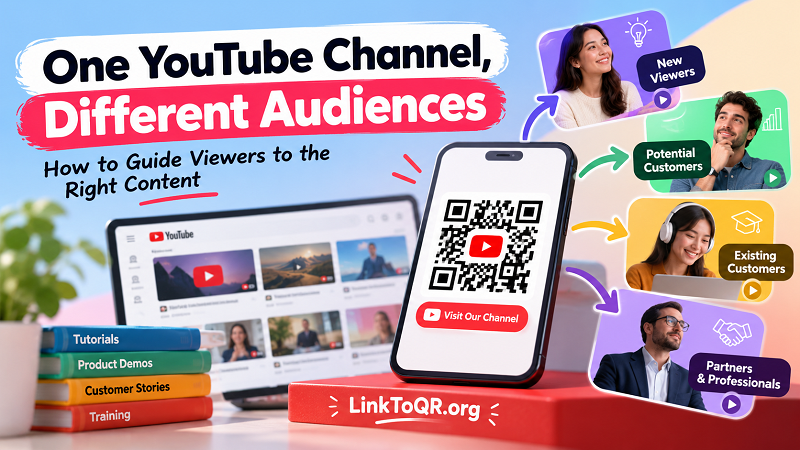
For example, a business channel might serve four distinct groups:
- First-time visitors want a quick introduction to the brand, its products, or its expertise.
- Potential customers want evidence, comparisons, demonstrations, and answers to practical questions.
- Existing customers need instructions, troubleshooting help, and information that makes their purchase more valuable.
- Partners and professional audiences may care about company capabilities, case studies, industry knowledge, or collaboration opportunities.
These groups can overlap, and you don't necessarily need a separate channel for each one. The goal is to identify the main reasons people visit and make relevant content easier to discover.
This distinction also helps with editorial decisions. A video that attracts broad attention isn't automatically the most useful video for someone evaluating a product. Likewise, a detailed tutorial might be excellent for existing customers but a poor introduction for someone who has never heard of your business.
Give each video a clear job. Once you understand that job, organizing the channel becomes much easier.
Build Content Paths Instead of a Video Pile
A useful channel doesn't force every visitor to explore from scratch. It offers recognizable starting points and logical next steps.
YouTube playlists can group videos around a shared need, such as getting started with a product, learning a particular skill, comparing solutions, or exploring customer success stories. This is more helpful than creating playlists simply because several videos happen to share a format.
Channel sections can also highlight important collections and make the homepage easier to scan. A new visitor might see introductory content first, while a tutorial collection gives existing users a clear route to practical help. Featured videos can provide context before someone commits to exploring the rest of the library.
Consistency matters, too. Titles should communicate what a viewer will learn or achieve, while thumbnails should help people distinguish one topic from another. If every thumbnail uses nearly identical wording and visual treatment, even a well-organized channel can feel confusing.
Think of the experience as a series of small decisions. A visitor recognizes a relevant topic, selects an appropriate video, finds the information they need, and understands what to explore next. You don't need to control every step, but you can remove unnecessary guesswork.
Where a YouTube Channel QR Code Fits Into the Strategy
Not every viewer discovers your channel through YouTube search or recommendations. Some encounter your brand on product packaging, printed brochures, business cards, event displays, classroom materials, or signs inside a physical location.
In these situations, a youtube channel qr code can bridge the gap between an offline interaction and your online video library. Instead of asking people to remember a channel name, type a potentially awkward URL, or search through similar results, you give them a direct route to your channel.
But there's an important catch: making access easier doesn't automatically make the destination more useful.
Imagine scanning a QR code printed beside a product display. The viewer expects to learn more about the product, but lands on a channel dominated by unrelated company announcements. The scan worked perfectly; the content journey didn't.
The solution starts before you generate the code. Decide who will encounter it, what they are likely to want, and whether the channel homepage is the most appropriate destination. If your goal is to introduce the broader brand, the channel may be ideal. If the surrounding message promises a specific setup guide, a direct link to that tutorial may deliver a better experience.
Match the destination to the promise. That simple principle makes offline promotion feel intentional rather than improvised.
When Should You Send People to the Channel—and When Should You Not?
A channel homepage is useful when you want people to explore a wider collection of content. It gives curious viewers room to discover your brand, browse different topics, and decide what interests them. This approach can work particularly well for general promotional materials, networking events, and brand awareness campaigns.
A specific video is often better when the audience has one clear task. Someone reading instructions for a product doesn't necessarily want to browse your entire channel before finding the relevant demonstration. A focused destination reduces the number of decisions they need to make.
Playlists can occupy the middle ground. They're useful when a topic requires several videos, when content follows a learning sequence, or when viewers benefit from exploring a curated collection rather than a single upload.
The right choice depends on context, not a universal rule. Consider the message printed beside the link, the viewer's likely familiarity with your brand, and the action you hope they'll take. A broad invitation such as "Explore our video library" creates different expectations from "Watch the installation guide."
Also, don't confuse a successful scan with a successful outcome. If your goal is to help customers complete a task, the useful measure is whether they can find the answer. If your goal is brand discovery, you may care more about whether visitors explore relevant videos and return later. Choose measurements that reflect the original purpose.
Make Your Channel Easier to Navigate as It Grows
A content strategy shouldn't become a maintenance nightmare. You don't need to redesign your channel every time you upload a new video, but you do need a repeatable way to keep the experience coherent.
Start by reviewing your existing library. Identify outdated information, videos that serve similar purposes, and valuable resources that are difficult to find. Group content according to viewer needs, then give the most important collections visible positions on the channel homepage.
Next, examine the experience from the perspective of someone unfamiliar with your business. Can they understand what the channel offers? Are the main topics recognizable? Do titles make the value of each video clear? If someone arrives from a printed QR code or an external recommendation, will the channel make sense without additional explanation?
Finally, revisit your content organization as your audience changes. A business expanding into new markets may need clearer language-specific collections. A creator moving from introductory material to advanced tutorials may need more deliberate learning paths. A company adding customer education videos may need to distinguish support content from promotional content.
The goal isn't to make every visitor follow the same route. It's to make the right route easier to recognize.
A Better Channel Experience Starts Before the Next Upload
Publishing consistently can help build a valuable video library, but volume alone doesn't guarantee a good viewing experience. As your audience grows, the real challenge becomes helping different people find the information that matters to them without making them work for it.
Organize videos around viewer intent, create meaningful content collections, and choose destinations that match the promises made in your marketing materials. When you connect offline touchpoints to your channel, make sure the content waiting on the other side is worth the scan.
Your YouTube channel doesn't need to be everything to everyone at once. It needs to help each visitor find a useful next step. Get that right, and your existing content can become far more valuable without requiring you to publish another video every time someone gets lost.