A receipt usually has a pretty short life. A customer checks the total, folds the paper into a wallet or shopping bag, and eventually forgets about it. For businesses, though, that little slip of paper can be much more than proof of purchase. With the right idea behind it, a receipt can become a simple way to keep the conversation going after the customer has already walked out the door.
- The Receipt Isn't the End of the Customer Journey
- Give Customers a Reason to Scan
- Choose One Useful Destination
- Don't Forget the Reality of Printed Receipts
- The Best QR Destination Depends on the Moment
- Turn a Disposable Slip Into a Useful Touchpoint
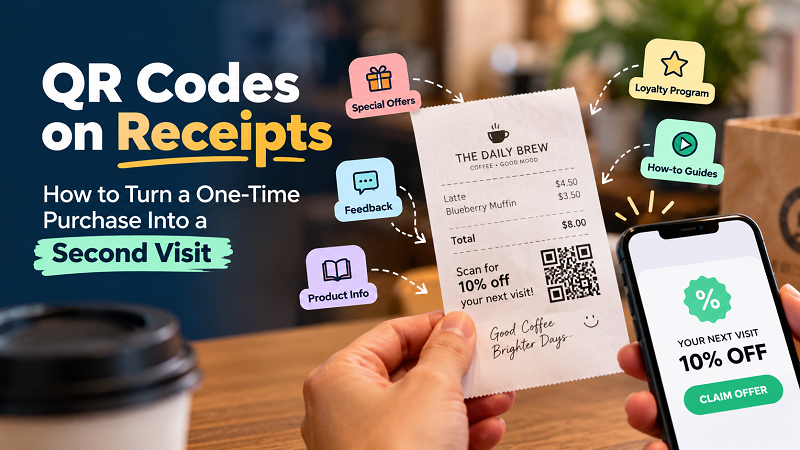
That's where a QR code becomes interesting. Instead of filling the receipt with another phone number, website address, or block of promotional text, a business can give customers a direct path to something useful. It could be a discount for their next visit, a quick feedback form, a product guide, a loyalty program, or a seasonal promotion. The technology isn't the interesting part. The real opportunity is what happens after the purchase.
The Receipt Isn't the End of the Customer Journey
It's easy to think of a receipt as the final step of a transaction. The customer pays, receives the receipt, and the interaction is finished. But from a marketing perspective, that moment can actually be the beginning of the next interaction. The customer has just chosen your business, which means there is already some level of interest or trust. A well-timed invitation can turn that completed purchase into another reason to engage.
Imagine someone buying coffee from the same shop every Saturday. A QR code on the receipt could offer a small reward for their next visit. A customer purchasing a kitchen appliance might need installation instructions or a recipe guide. Someone ordering from a restaurant might be willing to leave feedback while the experience is still fresh. In each case, the QR code works because it solves a problem or offers something relevant rather than simply existing as decoration.
This is an important distinction. A QR code does not automatically create engagement. It creates a shortcut. Whether people use that shortcut depends on where it leads and whether the destination is worth reaching.
Give Customers a Reason to Scan
One of the easiest ways to make a receipt QR code ineffective is to place it on the page with nothing but “Scan Here” next to it. The customer still has to wonder what happens after scanning. People are busy, and nobody wants to spend time decoding a mystery square just because a business told them to.
A better approach is to explain the benefit in a few words. “Scan for 10% off your next visit” immediately communicates value. “Scan for product instructions” tells the customer exactly what they will find. “Scan to share your feedback” sets a clear expectation. The QR code becomes much more compelling when the customer understands the reason behind it before opening their camera.
This also gives businesses a useful way to think about their post-purchase strategy. Instead of asking, “Where can we put a QR code?” ask, “What could our customer reasonably want to do next?” That small change in thinking can lead to much better destinations.
Choose One Useful Destination
A QR code on a receipt doesn't need to become a miniature navigation menu. In fact, giving it too many jobs can make the whole experience less effective. If your main objective is encouraging another purchase, send customers to the offer. If you're trying to collect feedback, take them directly to the form. If customers often need help using the product, send them to the relevant instructions.
The destination should match the customer's situation.
For example, a clothing store could use its receipt QR code to introduce a limited-time offer for the customer's next purchase. A restaurant could use it for a short review form or a digital loyalty program. A retailer selling technical products could provide setup instructions, warranty information, or a demonstration video. A local business running a seasonal campaign could use the receipt as another entry point into that promotion.
Once the destination is ready, turning it into a scannable code is straightforward. Businesses can create qr code from link and then test the result before adding it to the receipt design. The important part isn't the generation process itself; it's making sure the URL, page, offer, and customer experience all work together.
Don't Forget the Reality of Printed Receipts
There is one detail that looks boring on screen but becomes very important in the real world: receipts are not websites. They're narrow, lightweight pieces of paper, and many are printed on thermal printers with limited resolution. A QR code that looks perfect in a design file can become difficult to scan when it is printed too small or surrounded by clutter.
Give the code enough space around it and avoid placing it directly against other text or graphic elements. Keep sufficient contrast between the code and the paper, and don't make the customer hunt through the receipt to find it. If the receipt is particularly narrow, the QR code should be treated as a functional element rather than another piece of decoration.
Most importantly, test the actual printed receipt. Scan it with different phones, try it under ordinary store lighting, and follow the entire journey from the receipt to the destination page. This catches problems that aren't always obvious in a design preview. If you're printing thousands of receipts, discovering a scanning problem afterward is considerably less fun than discovering it beforehand.
The Best QR Destination Depends on the Moment
There is no universal “best” destination for a receipt QR code because the right choice depends on what the customer has just done. That's actually good news. It means businesses don't have to copy somebody else's QR campaign just because it looks successful.
Think about the natural next question your customer might have. Someone who just bought a product may want to know how to use it. Someone who just ate at a restaurant may want to share their experience. Someone who has made a purchase from a favorite store may appreciate an incentive to return. Someone who has joined a promotion may want to check the next step.
The strongest QR experiences usually feel like a continuation of the purchase rather than an advertisement that was randomly attached to it.
Turn a Disposable Slip Into a Useful Touchpoint
The humble receipt probably isn't going to become the star of your marketing strategy, and it doesn't need to. Its value comes from something much simpler: timing. It reaches the customer immediately after a transaction, when the business is still fresh in their mind and the reason for their purchase is still relevant.
That makes it a surprisingly useful place for a small digital doorway. A QR code can turn a static receipt into an invitation to return, learn, respond, or continue the relationship. The winning formula isn't complicated: choose one genuinely useful destination, explain why the customer should scan, make the code easy to find, and test the printed version before putting it into regular use.
A receipt might only be a few inches of paper, but it doesn't have to be the end of the story. With a smart QR experience, the final line of a transaction can quietly become the first step toward the next one.