“What's your Facebook?”
- The awkward moment nobody plans for
- The real problem isn't your Page. It's the handoff.
- One scan can replace a surprisingly long conversation
- Where a Facebook Page QR code actually makes sense
- Don't send people to Facebook just because you can
- Make the code part of the conversation
- A QR code is only useful if the experience works
- Creating a Facebook Page QR code doesn't need to become a tech project
- Make the next conversation easier
It sounds like an easy question. You say the name of your Page, the other person pulls out their phone, opens Facebook, types something into the search bar, and… suddenly things get weirdly complicated.
Maybe your Page has a name that is difficult to spell. Maybe several businesses have similar names. Maybe your username doesn't match the name people remember. Or maybe the person simply can't find the right Page among a pile of search results.
None of this means your Facebook Page has a problem. The problem is the handoff.
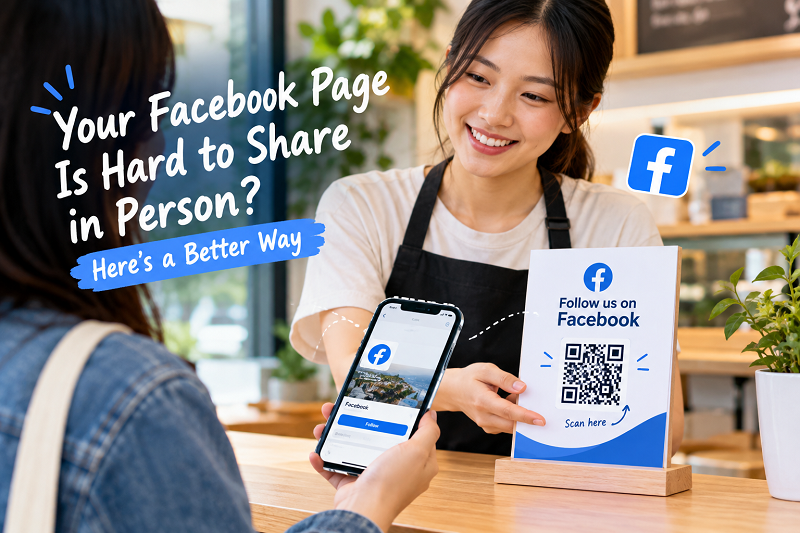
When someone is standing in front of you and wants to visit your Page, every extra step creates another opportunity for the interaction to lose momentum. A simple QR code can remove much of that friction by turning “find my Facebook” into a quick scan.
The awkward moment nobody plans for
Offline conversations move quickly. A customer asks where they can find your business online. You tell them the Facebook Page name. They search. You spell it again. They show you their screen. You realize they've landed on a different Page.
It's not exactly a marketing disaster. It's just… unnecessary.
People are accustomed to getting almost everything instantly on their phones. Asking someone to remember a business name, open Facebook, type it correctly, compare search results, and choose the right profile feels strangely old-fashioned when there is a much shorter path available.
This matters even more for businesses whose Facebook Page is part of the customer relationship. A restaurant may want customers to see new promotions. A local shop may post product updates. A service provider may use Facebook as the easiest way for customers to ask questions. A creator may simply want people to follow their Page after meeting them.
In each case, the objective is the same: get the person from a real-world interaction to the correct Facebook destination with as little friction as possible.
The real problem isn't your Page. It's the handoff.
A Facebook Page can be perfectly optimized and still be annoying to share in person.
Think about what happens without a QR code. You provide a name. The other person searches for it. Facebook returns several results. They look at profile pictures, locations, names, or recent posts. Eventually they hopefully find you.
Now compare that with a QR-based handoff. You show a code. They scan it. Their phone opens the destination.
The difference isn't about making Facebook more powerful. It's about removing a small task from the customer's side.
That distinction is useful because QR codes are sometimes treated as marketing decorations. A square graphic gets printed on a poster, added to a counter sign, or placed on packaging, and everyone assumes the job is finished.
It isn't.
A QR code works when it removes friction at exactly the moment someone needs the information behind it.
One scan can replace a surprisingly long conversation
Imagine a customer has just bought something from your store.
You could say, “Follow us on Facebook. Search for Minmart…” Then you wait while they type. Or you could point to a small sign that says, “Follow us on Facebook” with a QR code underneath.
The second version gives the customer control. There is no username to remember, no spelling exercise, and no need to wonder whether they found the correct Page.
That same principle works outside retail.
At an event, someone you just met may want to connect with your business. At a restaurant, a customer may want to see future promotions. At a service counter, someone may want to message you later. At a trade show, a potential customer may want to check your social presence after walking away from your booth.
The QR code isn't replacing the conversation. It simply makes the next step easier.
Where a Facebook Page QR code actually makes sense
The best placement isn't necessarily the biggest placement.
A QR code can be more useful when it appears exactly where the decision to visit your Page naturally happens. A small card handed to a customer can work better than a giant poster nobody notices. A counter display can make sense when customers are already waiting. A product insert can work when someone has just received what they purchased.
Think in terms of moments rather than marketing channels.
- After a purchase: The customer has already interacted with your business, so asking them to stay connected makes sense.
- During an event: People are already meeting new brands, creators, and businesses. A scan gives them an easy way to continue that relationship after the event ends.
- At a physical location: Customers shouldn't have to remember your Page name after leaving the store. Give them a shortcut while they're already there.
- On printed materials: Business cards, flyers, menus, receipts, packaging inserts, and small promotional cards can all become bridges between physical and digital experiences.
The common thread is simple: the person already has a reason to visit your Page. The QR code just removes the unnecessary search step.
Don't send people to Facebook just because you can
There is another detail worth thinking about before creating a QR code: destination.
If the goal is to help someone find your Facebook Page, send them to the Page. Don't make them scan a code only to land somewhere generic and then search again.
This sounds obvious, but it is an easy mistake when businesses reuse old QR codes or point several campaigns toward the same destination.
The destination should match the action you are asking people to take.
Want them to follow your Page? Make the Page the destination. Want them to read a specific announcement? A relevant post or landing page may make more sense. Want them to contact your business? A direct contact destination could be more useful.
The QR code itself is only the shortcut. The destination determines whether that shortcut is actually useful.
Make the code part of the conversation
Another common mistake is hiding the QR code without explaining why someone should scan it.
A random black-and-white square sitting on a counter doesn't communicate much. A QR code next to a clear message does.
Try something simple:
Follow us on Facebook — scan here.
Or:
See what's new on our Facebook Page.
Or:
Want updates? Scan to follow us.
The exact wording isn't important. The expectation is.
Someone should be able to look at the sign for a second and understand what happens after the scan. That's especially important when the QR code is being used in a physical environment where people are moving quickly.
A QR code is only useful if the experience works
Before putting a Facebook QR code on hundreds of flyers or printing it onto packaging, test it.
Scan it with more than one phone. Check that it opens the intended Facebook Page. Make sure the Page is publicly accessible. Look at the code from the distance where people are expected to scan it. If it appears on printed material, test an actual printed sample rather than trusting the version on your monitor.
You don't need a complicated testing process. You just need to experience the journey from the user's side.
Scan.
Wait.
See where you land.
Ask yourself: “If I didn't create this QR code, would I immediately understand what to do next?”
If the answer is yes, you're in good shape.
Creating a Facebook Page QR code doesn't need to become a tech project
Once you have the correct Facebook Page URL, the technical part is straightforward. You don't need to make customers type the URL, memorize your username, or search through Facebook results.
You can use a qr code for facebook page to turn the Page URL into a scannable shortcut, then test the result before using it on your printed or digital materials.
The important part isn't the generator. It's choosing the right destination and putting the QR code somewhere that makes sense.
That's the difference between a QR code that merely exists and one that actually gets used.
Make the next conversation easier
The best QR codes are almost invisible in the customer experience.
Someone asks for your Facebook. You don't need to spell anything. They don't need to search anything. They simply scan and continue.
That tiny change can make an offline interaction feel much smoother.
And that's really the point. You aren't trying to impress people with a piece of technology. You're removing one annoying little obstacle between a person who is already interested and the Facebook Page you want them to visit.
Sometimes good marketing isn't about adding another feature.
It's about removing one more unnecessary step.